Log in



AI summary
Overview: The article addresses business IT infrastructure—the combination of hardware, software, networking and storage that enables daily operations—and how those systems must evolve as an organisation grows. It outlines common deployment models (on‑premises, colocation, virtual machines, public cloud, dedicated servers and mixed/hybrid arrangements) and explains that each option has distinct implications for performance, cost, security and the team’s operational responsibilities.
Key considerations: Effective planning starts with an inventory of systems and their dependencies, measurement of workload and peak behaviour, and clear availability and recovery objectives. Decisions should factor in who will operate and support each component, the full lifecycle costs (procurement, ongoing licenses, administration and scaling), and the need to test backups and restoration. Trade‑offs include control versus operational burden, predictable versus elastic costs, and proximity to local equipment versus resilience to infrastructure failures.
Bottom line: Choose infrastructure based on a concise requirements document that captures performance, recovery and growth expectations, validate the design through testing and migrations, and assign precise ownership so the environment delivers reliable access, manageable costs and recoverability as the business changes.
A growing business asks more of its technology. The website has more visitors to serve, employees need reliable access to their tools, and applications have more data to process and store. Somewhere along the way, the IT setup that got the company started begins to feel stretched.
Business IT infrastructure, as it’s colloquially known, brings those systems together. The hardware, software, networking, and storage behind everyday work. Choosing the right setup means understanding what your business needs today, what could interrupt it, and how those demands might change. Knowing this takes experience.
The options are so many that it gets confusing, though. Should you keep equipment on your premises, rent dedicated servers, use cloud services, or combine them? Each choice affects performance, costs, security, and how much work your team takes on. What is a sensible setup for a small to consultancy could leave an online retailer struggling during its busiest week.
This guide explains the components of business IT infrastructure, compares the main options, and walks through the setup process for small and medium businesses. We’ll also cover operating costs, maintenance, and recovery, with a checklist to help you assess your current environment and plan your next steps.
What Is Business IT Infrastructure?
Business IT infrastructure is the hardware, software, networks, and services that keep a company’s systems running. It gives employees access to their tools, supplies the computing power behind applications, and stores the information the business depends on—from customer records to the invoices waiting for payment.
Some of it sits in your office. Some runs in a provider’s data center. A small business might spread its infrastructure across employee laptops, an office network, and several cloud services without owning a single server.
But whatever the setup, someone needs to look after the connections, accounts, and data that make the whole arrangement work.
What Exactly Does It Include?
The easiest way to understand business IT infrastructure is to look at the jobs its components perform.
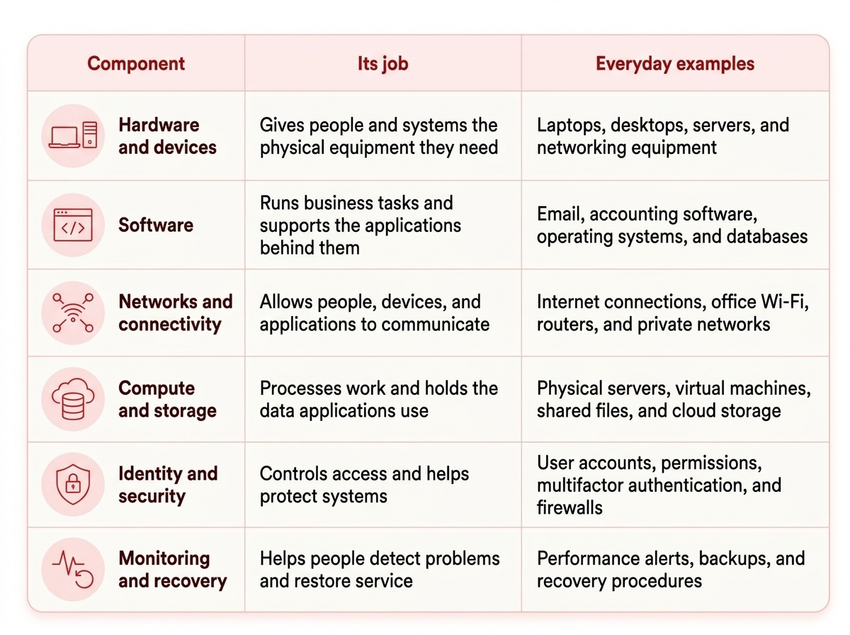
Of course, these categories will overlap. A server can supply computing power and storage, while a cloud service can bundle several functions into one subscription. You don’t need a separate product for every row.
You do need to understand how the pieces connect, however. In an online store, a purchase can pass through the storefront, payment service, stock database, and warehouse application. Each system handles a different part of the transaction, and each depends on information arriving from somewhere else.
That’s why infrastructure planning involves more than choosing equipment. A faster server won’t resolve a broken connection between the store and its stock database. Someone has to trace the transaction and find where it stops.
What Strong IT Infrastructure Means for Your Business
Strong IT infrastructure shows its value in everyday work. That means employees opening files without delays, customers completing purchases, and applications staying responsive during busy periods.
And if there are weaknesses, they’ll be very noticeable, very quickly. A slow database can hold up everyone using the same application. An unreliable connection can interrupt calls, payments, and access to shared documents. These problems consume working time long before anyone declares a major outage.
Here is a general overview of the practical value of robust infrastructure.
Find a dedicated server with the processing power, memory, and storage your applications need.
Keep Daily Operations Moving
Reliable infrastructure reduces the technical interruptions that stop people from doing their jobs. Your sales team needs access to customer records, finance needs transaction data, and the warehouse needs orders to arrive in time for dispatch.
Those activities often share dependencies. If the application server becomes unavailable, several departments may lose access at once. If the office connection fails, employees can lose access to services that are otherwise working perfectly.
Give Customers a Consistent Experience
Infrastructure helps determine how quickly and reliably customers can use your services. They experience it through the pages they open, the searches they run, and the transactions they try to complete.
An online store needs enough processing power, storage performance, and network capacity to handle its workload. When demand rises, a bottleneck in any of those areas can make the whole service feel slow—even if the rest of the infrastructure has capacity to spare.
Support Growth Without Repeated Rebuilds
Well-planned infrastructure gives you a practical way to add capacity as the business develops. A new customer portal, another office, or a larger product catalog can introduce requirements your original setup never had to meet.
Growth also changes how systems work together. An application that once handled customer records may start exchanging data with accounting, reporting, and support tools. Each connection adds something to maintain.
You don’t need to buy several years of spare capacity upfront. You do need to understand how you’ll expand—whether that means adding resources to a virtual machine, introducing another server, or extending the network between services. Knowing that path makes it easier to plan the next investment.
Protect Information and Make Recovery Possible
Dependable infrastructure includes a way to protect and recover the information the business needs. Customer records, contracts, financial data, and application databases all require appropriate access controls, maintenance, and backups.
Protection has several jobs. Access controls help limit who can change a record. Backups give you a way to recover an earlier copy. Recovery procedures explain how to get the application and its data working together again.
Recovery speed matters too. If restoring the order system takes longer than the business can tolerate, the team needs to address that gap before an incident exposes it. A successful backup notification tells you that one job finished; a restoration test tells you much more about whether the business can resume work.
Make IT Costs and Responsibilities Easier to Manage
A clear infrastructure setup makes it easier to understand what you’re paying for and who keeps each part working. That matters when several applications share resources, support comes from different suppliers, and subscriptions renew on different dates.
Without that visibility, it’s easy to keep paying for unused capacity while an important system struggles elsewhere. Maintenance can also fall between teams—each assuming someone else owns the task.
The choice of provider belongs in this discussion. Hardware specifications tell you part of what you’re buying. Network reliability, expansion options, recovery capabilities, and the scope of technical support help determine how well the service will fit your business over time.
How to Plan Your Business IT Infrastructure
Start by listing the systems your business depends on, what they need to run properly, and what happens when they become unavailable. Add your budget, growth plans, and the work your team can reasonably take on. Those requirements give you a basis for comparing equipment, hosting services, and support.
You can begin with a spreadsheet. The useful part is getting the information out of people’s heads – and checking the assumptions everyone has quietly been working around.
Map What You Already Have
List the applications, equipment, and services behind daily work, including the connections between them. Email and accounting will probably make the list immediately. The tool that transfers website orders into the warehouse system deserves a place too.
For each important system, record:
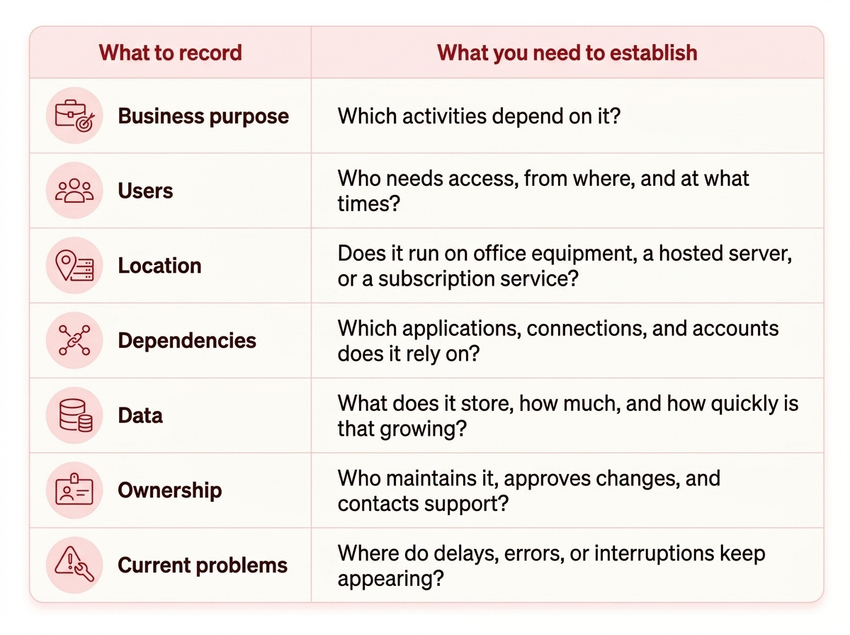
Include services employees have bought themselves for company work. A file-sharing account opened for one project can become the place an entire department keeps its documents. You’ll want to know who controls it before the person paying for it leaves.
Measure What Your Applications Need
Look at demand during ordinary working hours and busy periods. Monthly averages can conceal the bursts that make an application sluggish—staff running reports at the same time, customers arriving after a promotion, or an overnight processing job competing with backups.
For applications you host yourself, collect information about:
- Processing power: When does CPU use rise, how long does it stay high, and does that affect the work?
- Memory: How much does the application need during normal use and its busiest periods?
- Storage: How much space does it use, how quickly is that growing, and how fast must it read and write data?
- Network traffic: How much data moves between users, applications, and locations?
- Response times: How long do meaningful tasks take—opening a customer record, searching the catalog, or completing checkout?
The measurements need context, though. High CPU use during a scheduled job may be acceptable if it finishes on time and leaves other work unaffected. A checkout that slows whenever traffic rises needs investigation.
For a new application, start with estimates and test them. Record the assumptions (simultaneous users, transaction volumes, file sizes) so someone can compare them with real use after launch. Otherwise, an educated guess can quietly become a permanent specification.
Set Availability and Recovery Requirements
Decide how long each important system can remain unavailable and how much recent data the business could afford to lose. Involve the people responsible for the work: the warehouse manager knows what a two-hour interruption would mean for that day’s dispatch.
These are separate questions. Restoring an application quickly won’t settle the problem if its database is missing the morning’s orders.
Make the consequences concrete. Record which tasks stop, whether employees can work around the interruption, and how long that workaround remains practical. A temporary spreadsheet might keep a small sales team working for an afternoon. Reconstructing hundreds of online orders is a different undertaking.
Those answers help establish the backup frequency, recovery procedures, and infrastructure resilience you’ll need. They also give you something to test before the business has to depend on it.
Establish Who’ll Run the Setup
Choose an arrangement your team can sustain. Servers and applications bring recurring work—updates, permissions, monitoring, backups, and faults that don’t always arrive during office hours.
Assign an owner to each task, then check what happens when that person is unavailable. For external support, establish the service’s scope, coverage hours, contact routes, and escalation process.
Be precise about the handoffs. A provider might maintain the physical server and network while your team looks after the operating system and application. Another service might cover some of that administration too. The agreement should tell everyone who investigates which problems.
That clarity matters when something breaks. You don’t want three support teams discovering their respective responsibilities while customers wait.
Account for Growth and the Full Operating Cost
Plan around changes you can reasonably anticipate—another office, a new application, a larger customer base, or a growing archive of files. Each can add demand somewhere different.
Adding employees might increase account and device costs without putting much extra pressure on your application servers. Launching a customer-facing service could substantially increase server and network demand before you hire anyone.
Then build a budget that covers the complete arrangement:
- Initial equipment, configuration, migration, and testing.
- Recurring infrastructure, connectivity, licenses, backups, and support.
- Staff or contractor time for administration and maintenance.
- Capacity increases, replacements, and future changes.
You may choose a higher-priced service because it covers work your team would otherwise handle. Check exactly which tasks it removes and what remains yours.
By the end of planning, you should have a short requirements document: what each system must support, what needs changing, who’ll manage it, and what you can spend. Use that document when comparing proposals, and ask providers to explain how their recommendations meet it.
Where Should Your Business Systems Run?
Choose an environment for each system based on its performance needs, connections to other applications, recovery requirements, and the work your team can manage. You may end up using subscription software for accounting, a cloud environment for your customer portal, and local equipment for warehouse operations.
A virtual machine can run in your office or a provider’s cloud, and dedicated servers can form part of a larger cloud environment. Start with two questions: do you need to run the application yourself, and what infrastructure would suit it?
Use Subscription Software When It Covers the Job
Software as a service (SaaS) makes sense when an existing application meets your requirements and you want the vendor to run the software and underlying infrastructure. Email, accounting, and customer management are familiar examples.
You’ll still need to configure accounts, manage permissions, and check how the application exchanges information with your other systems. Before subscribing, establish whether the plan includes the integrations, storage, support, and data-export options you need.
Customization deserves a closer look, though. If your team spends hours working around the software’s limitations, investigate whether configuration or an integration would solve the problem. Hosting your own application brings additional responsibilities, so the business needs a clear reason to take them on.
Keep Systems Onsite When Local Access Matters
On-premises infrastructure can suit applications that need a close connection to local equipment or must keep working when the internet connection fails. A production system communicating with machinery may have different requirements from the company’s public website.
Check the dependencies before assuming local equipment gives you independence. An application running in your building might still need an external login service, a remote database, or an internet connection to validate its license.
Owning the equipment also gives you the job of maintaining its operating environment—power, cooling, physical access, hardware replacement, and recovery. An office cupboard with a server in it needs attention too.
For existing equipment that you want to keep, colocation offers another arrangement: you place your hardware in a provider’s data center. Compare the facility, connectivity, access arrangements, and onsite assistance, alongside the cost of continuing to operate it yourself.
Start With a Virtual Machine for a Straightforward Hosted Application
A hosted virtual machine can be a practical starting point when you need control over an application without buying a physical server. You select computing resources, storage, and an operating system, then install and manage the software your business needs.
A small customer portal or internal application may fit comfortably on one VM. Its suitability depends on the workload and recovery requirements, so check those before putting several important services on the same machine.
Ask how the service handles expansion and hardware failure. Moving to a larger plan might involve a restart or migration, and recovery capabilities vary between providers. Establish what the service includes before your business depends on it.
Build a Cloud Environment When You Need Several Services
A public cloud environment becomes useful when your application needs several connected resources—separate web and database servers, private networking, additional storage, or a load balancer that distributes requests between servers. Cloud platforms can bring these resources together through a portal or API.
Consider a company running a customer application alongside development and testing environments. A cloud platform can let the team create those environments separately, control their connections, and adjust resources as requirements change.
Flexibility still needs management, though. Adding another application server only helps if the application can use it. Someone must configure scaling, check resource limits, and monitor what the environment consumes.
Compare the complete service: compute, storage, network traffic, backups, and supporting features. Include the time your team will spend operating it.
Build your next cloud environment with compute, storage, and networking you can manage in one place.
Choose Dedicated Servers When Hardware Control Is Paramount for You
A dedicated server gives your business a physical machine reserved for its use. It can suit workloads that need particular processors, substantial memory or storage, or direct control over how the hardware runs your software. Dedicated machines can also serve as building blocks for clusters and private cloud environments.
For sustained workloads, compare the cost of the hardware configuration with an equivalent cloud setup over a realistic operating period. Include administration, backups, networking, and the capacity you’ll actually use. The result will depend on the application and the service terms.
Dedicated hardware needs a recovery design too. One powerful machine still leaves you with a service interruption if that machine fails. Depending on your requirements, you may need a second server, replication, or a tested restoration process.
Ask how upgrades and replacements work. You’ll want to know the lead time, expected interruption, and who handles the work before scheduling a change.
Combine Environments When Each Has a Clear Role
A mixed setup can let you keep useful systems in place while introducing infrastructure for new requirements. Connecting on-site systems with cloud resources creates a hybrid environment.
A manufacturer might keep its production application onsite and host a customer portal in the cloud. That arrangement needs a clear plan for exchanging information, controlling access, and handling a failed connection between the two.
Follow the dependency: if the portal needs a live stock count from the local system, what happens when the factory’s internet connection drops? Decide whether customers can continue using the portal, which information remains available, and how the systems catch up afterward.
Combining environments adds connections and responsibilities. Give each part a clear purpose and assign someone to manage the whole arrangement.
Compare the Options Against Your Requirements
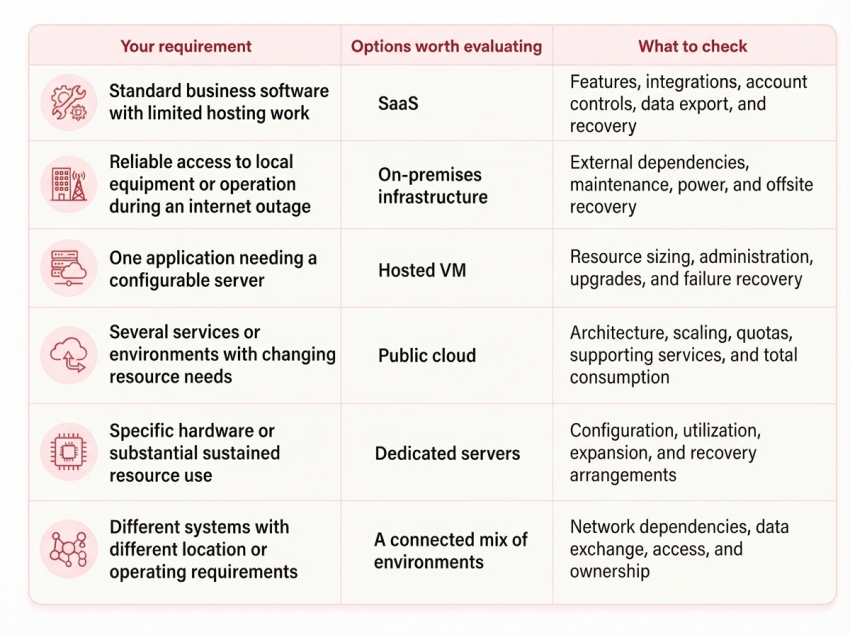
Use your requirements document to compare actual proposals. Ask each provider to explain how its configuration supports your workload, what happens during a failure, and which tasks your team will retain.
Business IT Infrastructure Setup Checklist
Once you’ve chosen the environment, configure it, test the business processes it supports, and hand over responsibility. Use this checklist before employees or customers start relying on it.
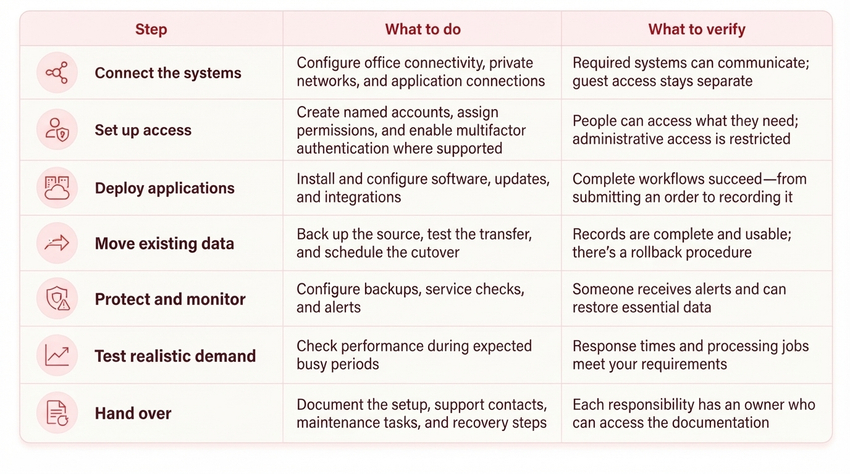
For a migration, agree when you’ll proceed, pause, or roll back. Keep the existing environment available until you’ve confirmed the replacement works and reconciled any data changes made during the move.
What Changes for a Medium-Sized Business?
As locations, applications, and teams multiply, repeatable administration becomes more important. Centralized account and device management can help keep permissions and updates consistent, while documented change procedures make maintenance easier to coordinate.
Review capacity and support coverage too. A second office or longer trading hours may change who needs access, when systems must remain available, and who responds to faults. Use those changes to reassess the setup; employee numbers alone won’t tell you what needs upgrading.
Put Your Infrastructure Plan to Work
Start with the systems that matter most, establish their requirements, and choose infrastructure your team can operate. Test the arrangement before relying on it, then review it as the business changes.
If you need help choosing between virtual machines, public cloud, and dedicated servers, reach out. Bring your application requirements, usage figures, and recovery expectations so we can work through the options with you.
Does a small business need its own server?
Only if its applications or operating requirements call for one. A business using subscription software for email, accounting, and customer management may need no server of its own. Hosting a custom application, database, or internal service introduces different requirements.
How much does business IT infrastructure cost?
The total includes equipment or hosting, software licenses, connectivity, backups, support, and administration. Start with the applications you need to run, then calculate setup and recurring costs. Include your team’s maintenance time—it’s easy to overlook when comparing monthly prices.
Is cloud infrastructure cheaper than dedicated servers?
It depends on the workload and pricing model. Cloud resources can suit changing demand, while dedicated servers can offer good value for sustained resource use. Compare equivalent capacity, storage, traffic, support, and management costs over the same period.
Does a hosting provider manage our applications?
That depends on the service agreement. Infrastructure hosting can leave operating-system updates, application maintenance, permissions, and backups with your team. Check the scope of management and support before signing up, and assign an owner to every remaining task.
Can we upgrade our infrastructure without replacing everything?
Often, yes. You might add resources, move one application, or introduce another server while keeping the rest of the environment. Check dependencies, test the change, and agree on recovery or rollback procedures before switching over.