Log in

AI summary
The piece evaluates enterprise server refresh practices and market forces, arguing that many routine on-premises workloads do not require the latest-generation platforms. It highlights low average server utilization, rapidly rising hardware spend driven by AI-focused demand for memory and GPUs, and supply-pressure on newer components such as DDR5 and HBM, all of which increase the cost and lead time for new systems.
Core message: For a wide range of predictable business workloads, certified previous-generation servers can provide adequate capacity and reliability at materially lower capital and support cost; organizations should base procurement on actual workload bottlenecks, total cost of ownership (including software licensing, power, and maintenance), and long-term parts/support availability, and reserve newest-generation hardware for specific needs that genuinely require its higher memory bandwidth, GPU scale, or microsecond-level performance.
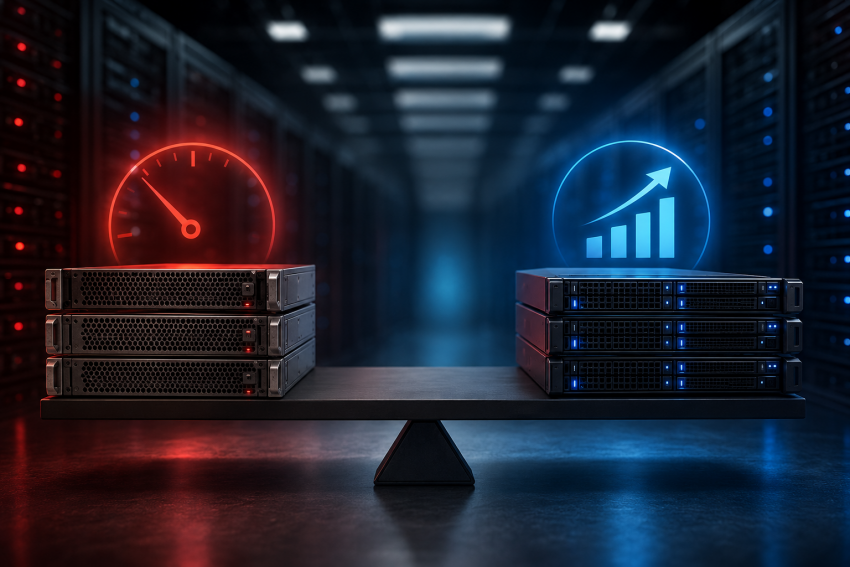
Most enterprise on-premises servers operate at just 12% to 18% of capacity on average. Buying new-generation compute platforms for routine workloads often delivers diminishing returns. Certified previous-generation hardware can meet those needs at a much lower CapEx – sometimes up to 70% lower.
At the same time, enterprise hardware spending is rising far faster than unit shipments. Organizations are paying steep premiums for AI-era silicon and DDR5 components they may not – and often do not – need.
We live in an era of AI-driven shortages and inflated prices. Organizations must focus on maximizing density per dollar.
Why five years old does not make a server obsolete
The three-to-five-year server refresh cycle is usually caused by warranty dates, tax depreciation schedules, and budgeting rules. Very rarely does it have anything to do with the actual condition of the hardware. And we say this as a company that has provided hardware and infrastructure solutions for more than 22 years.
Large organizations exploit this heavily. Microsoft, Google, Meta, and Amazon added almost $10 billion to their reported profits by extending the estimated useful life of their servers. Large banks, retailers, and logistics companies from the Fortune 100 still rely on platforms such as IBM Power and OpenVMS. Many of these systems have remained in production for 15 to 20 years or longer.
Five years is barely middle age for quality server hardware. Here’s why that is.
Core compute components seldom cause problems
CPUs and enterprise memory contain no moving parts. In a four-year study covering 290,000 hardware failure reports from hundreds of thousands of servers, CPU issues accounted for just 0.04% of reported component failures. Hard drives accounted for almost 82%. Memory, power components, and fans together accounted for around 5%.
Older servers still require maintenance, of course. Drives wear out, fans stop spinning, power supplies fail. But these components are modular and can usually be monitored and replaced without retiring the entire server.
Good cooling, preventive monitoring, spare parts, and redundancy can keep the underlying compute platform dependable for years beyond its original warranty period.
Support continues beyond the OEM warranty
Third-party maintenance providers continue to support servers, storage, and networking equipment long after the manufacturer’s warranty or end-of-service date. Coverage often includes spare parts and four-hour on-site response.
Actual savings depend on the equipment, location, coverage, and SLA. But TPM providers commonly advertise savings of 30% to 70% compared with OEM support renewals.
Add compute, memory, and storage capacity with enterprise hardware matched to your workload
The platforms still meet modern workload requirements
A server reaches the end of its useful life when it can no longer provide enough capacity, run supported software, or meet operational and security requirements. Many platforms released five or more years ago remain well within those limits.
Intel Xeon E-2288G processors, released in 2019, support up to 8 cores, 16 threads, dual-channel DDR4-2666 ECC memory, and high base clock speeds reaching up to 5.0 GHz Turbo. For websites, business applications, databases, storage, backup, and predictable virtualization workloads, these platforms still provide ample compute power, memory capacity, and I/O bandwidth.
Where previous-generation servers belong in a modern infrastructure strategy
A common misconception is that older hardware only belongs in minor, non-critical roles. That’s simply not the case. Here are some examples of how we see our clients deploying them in essential applications.
Private cloud and virtualization clusters
ERP systems, internal databases, CRM platforms, web services, and other predictable applications almost never need the latest processor generation. Previous-generation multi-core servers can support dense VMware, KVM, and container environments with large memory configurations and ample I/O capacity.
They also give teams more cores and RAM for the same hardware budget. This is important when infrastructure scale depends on the number of virtual machines or containers a cluster can support.
On-premises AI inference and local models
Training large foundation models requires powerful GPUs, high-bandwidth memory, and modern interconnects. That much is true. But running existing models for internal search, document processing, coding assistance, and other business tasks requires far less infrastructure.
When older hardware is equipped with suitable enterprise-grade processors, it easily supports local inference. On top of that, private server infrastructure also enables direct control over sensitive data, model access, and infrastructure costs.
Cloud repatriation
Always-on workloads with stable demand become expensive in the public cloud. Compute, storage, data transfer, and managed-service charges accumulate every month, even when resource requirements remain predictable.
Older servers lower the initial cost of bringing these applications back into dedicated or private infrastructure. The return depends on the workload and its current cloud bill, but the reduced CapEx can shorten the break-even period considerably.
Disaster recovery and backup
Disaster recovery systems and warm standby environments spend much of their time below full utilization. Their job is to provide reliable capacity when the primary environment fails.
Well-configured earlier-generation hardware can provide that capacity without tying up the budget required for the main production platform. The same logic applies to backup repositories, replication targets, and archival storage nodes.
Development, staging, and testing
Engineering teams need isolated environments with enough CPU, memory, and storage to reproduce production systems, run automated tests, and support parallel development.
Prior-generation servers provide high core and memory density at a lower acquisition cost. Teams can build larger development and test clusters without consuming the budget reserved for production infrastructure.
Stable web, database, and storage workloads
Web backends, content platforms, relational databases, file storage, and backup systems often have clear and measurable capacity requirements. Many depend more on memory size, storage quality, and network throughput than on the newest CPU architecture.
A server that’s five years old can meet these requirements for years, even if it’s a refurbished one. It will remain useful as long as monitoring confirms that it has enough capacity and continues to meet reliability and software-support requirements.
Why the steep price curve? The economics of new-generation server platforms
Worldwide server spending grew by 30.7% in the first quarter of 2026. Unit shipments increased by only 3.3%. Spending therefore grew more than nine times faster than server volumes. IDC attributes this gap to large-scale GPU server deployment, hyperscaler AI investment, and constrained supplies of memory and NAND flash.
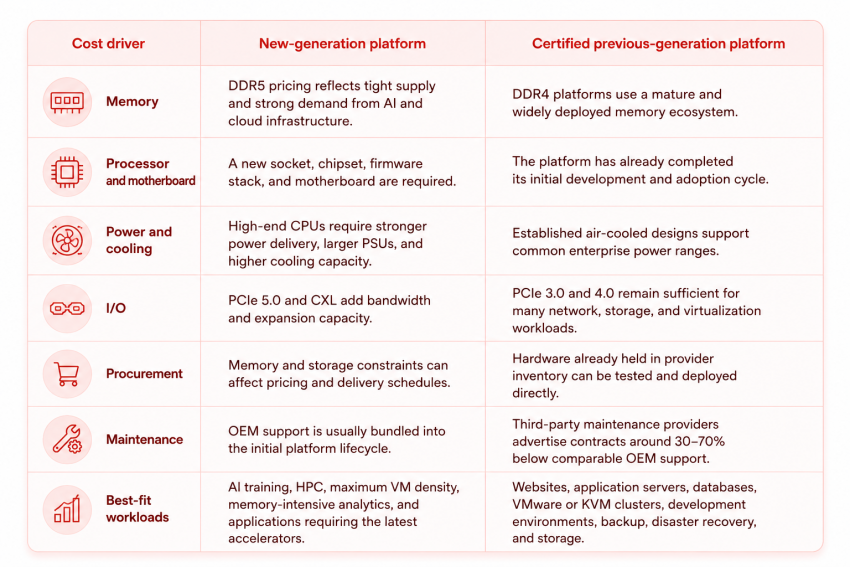
These market conditions affect the price of standard infrastructure as well. A new-generation server requires a complete platform built around the latest processor socket, DDR5 memory, motherboard, power-delivery system, cooling design, firmware, and I/O components. Each upgrade adds cost before the server runs its first production workload.
Memory has become a strategic bottleneck
AI infrastructure consumes enormous quantities of high-performance memory. Micron states that producing HBM creates an approximately three-to-one supply trade-off with DDR5, meaning the rapid expansion of HBM capacity places additional pressure on the wider DRAM market. The company expects industry supply to remain below demand beyond 2026.
Market intelligence firm TrendForce says basically the same thing in their structural outlook for 2027. Fueled by expanding AI inference workloads, demand growth for server DRAM is projected to outpace supply expansion across all major chipmakers through 2027, maintaining tight market conditions and sustaining upward momentum on contract pricing.
By contrast, DDR4 platforms bypass many of these immediate supply bottlenecks. Supported by an established ecosystem with years of manufacturing, deployment, and maintenance maturity, DDR4 processors, motherboards, and memory modules offer a far more accessible and price-stable alternative for standard workloads.
New processors require a more expensive supporting platform
The processor represents only one part of the purchase. Current server CPUs support more memory channels, PCIe 5.0, CXL, larger core counts, and much higher power envelopes. These capabilities require stronger voltage regulation, larger power supplies, more capable cooling, and more complex motherboard designs.
The 2019 AMD EPYC 7742 has a default thermal design power of 225 watts. Current AMD server processors reach up to 500 watts at the upper end of the range.
The additional platform capacity provides clear value for dense AI, HPC, analytics, and large-scale consolidation. A standard web application, internal database, development cluster, or moderately loaded virtualization host may use only a small part of that capacity.
AI demand now shapes the whole server market
AI systems represent a growing share of global server revenue. IDC expects elevated memory and NAND pricing to continue through at least the first half of 2027, with hyperscaler investment and rack-scale GPU deployments driving the wider market.
This creates a premium across the supply chain:
When newer hardware makes sense
Being smart about infrastructure CapEx doesn’t mean blindly avoiding new technology. There are specific scenarios where paying a premium for latest-generation hardware is sensible.
Newer platforms (such as Gen-5/Gen-6 architectures with DDR5 memory and PCIe 5.0) are the right call when your workload hits one of four specific operational triggers:
- Heavy AI Model Training & Massive Datasets: Training LLMs or complex deep learning neural networks requires massive parallel processing and HBM. Latest-gen PCIe 5.0/6.0 buses are necessary to keep high-end GPU clusters fed with data without creating severe system bottlenecks.
- Per-Core Software Licensing Math: When running enterprise software licensed strictly per core – such as Oracle Database or Microsoft SQL Server – the math changes dramatically. Paying top-dollar for fewer, hyper-fast modern cores can save hundreds of thousands of dollars in software licensing fees, far outpacing the extra cost of the server hardware itself.
- Ultra-Low-Latency Processing: In high-frequency trading, real-time telemetry analysis, or specialized scientific simulations, microsecond latency differences directly impact revenue or research. In these niche environments, a 10% to 15% increase in single-thread clock speed justifies the price premium.
If your workload doesn’t hit these specific barriers, paying for bleeding-edge silicon usually means funding headroom you will never actually use.
How to evaluate a dedicated server properly
Evaluating a server platform shouldn’t begin with a vendor’s spec sheet or top-line benchmark scores. It begins by understanding how your applications actually consume resources.
To avoid overpaying for unnecessary specs or falling into the hardware refresh trap, evaluate candidate servers through a five-step framework:
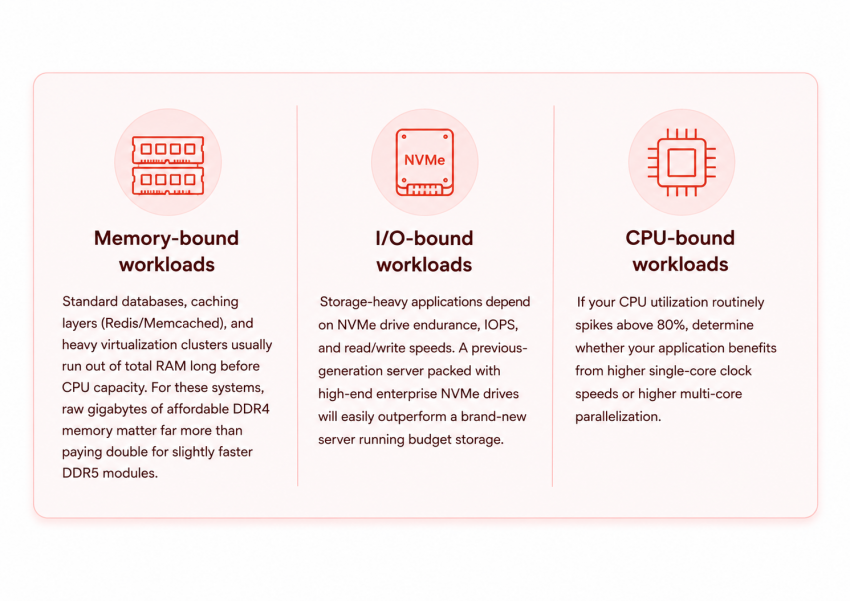
1. Identify your true workload bottleneck
Before shopping for hardware, look at your current monitoring data to see what limits your application performance:
2. Calculate Total Cost of Ownership (Hardware + Software)
Never evaluate hardware costs in a vacuum. Always pair the hardware price tag with its associated software licensing, power draw, and maintenance costs over a 3- to 5-year timeline:
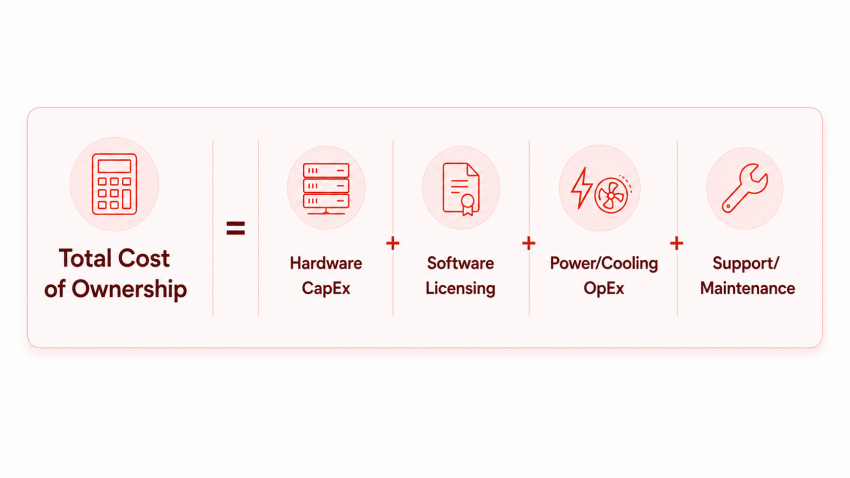
If software licensing accounts for 80% of your total stack cost, invest in faster CPU cores. If software is open-source or flat-rate (e.g., Linux, KVM, PostgreSQL), prioritize CapEx savings on certified previous-generation hardware.
3. Compare Power Draw vs. CapEx Savings
Older processors consume somewhat more electricity per core than the newest 3nm/4nm chips. However, for standard corporate workloads operating at typical 15% to 30% utilization rates, the extra electricity cost is often negligible – frequently totaling just $10 to $20 per month per server. Compare your local data center power costs against the $3,000 to $7,000 upfront CapEx savings of a previous-generation system; in most cases, it takes 5 to 8 years for power efficiency gains to offset the higher purchase price of new hardware.
4. Verify Long-Term Parts and Support Options
Before committing to a server model, verify how easy and affordable it will be to maintain over time:
- Are replacement power supplies, fans, and motherboards readily available on the open market?
- Can you secure Third-Party Maintenance with guaranteed 4-hour on-site SLAs?
- Is firmware and BIOS access freely downloadable, or is it locked behind an active, costly OEM support paywall?
Conclusion
The strongest infrastructure strategy is the one that delivers the required capacity at the right cost and within the required timeframe. For many websites, databases, virtualization clusters, development environments, backup systems, and other predictable workloads, certified previous-generation servers already provide everything the application needs.
This matters even more in the current market. AI infrastructure investment is placing pressure on memory, storage, and server-component supply, while hardware spending continues to rise much faster than shipment volumes. New platforms can therefore involve higher prices, constrained availability, and longer procurement cycles.
Advanced Hosting maintains a large inventory of previous-generation enterprise servers – alongside current-generation platforms for workloads that genuinely need them. The point isn’t old versus new; it’s matching each workload to the right hardware without overpaying for capacity you won’t use.
Thus, we can give you a practical way to add compute, memory, and storage capacity now while preserving your infrastructure budget for the workloads that genuinely require the latest generation. The result is faster deployment, predictable costs, and more useful capacity for every dollar spent.
Are five-year-old servers still reliable?
Yes, when they are properly tested, maintained, and monitored. CPUs and enterprise memory have no moving parts and account for a small share of hardware failures. Drives, fans, and power supplies are more likely to fail, but these components are modular and replaceable.
Which workloads are a good fit for previous-generation servers?
They are well suited to websites, application servers, databases, virtualization clusters, development environments, backup systems, disaster recovery, storage, and other predictable workloads. These systems often depend more on available RAM, storage performance, and network capacity than on the newest processor architecture.
When is new-generation server hardware worth the higher price?
New platforms make sense for heavy AI training, high-performance computing, memory-intensive analytics, ultra-low-latency processing, and workloads requiring the latest GPUs or high-bandwidth interconnects. Faster modern cores may also reduce costs when enterprise software is licensed per core.
How much can certified previous-generation hardware reduce costs?
The article estimates that previous-generation hardware can reduce initial CapEx by as much as 70% in some cases. Third-party maintenance providers also commonly advertise support savings of 30% to 70% compared with OEM renewals, although actual savings depend on the equipment, location, SLA, and coverage.
How should a business compare new and previous-generation servers?
Start with monitoring data and identify whether the workload is limited by memory, storage I/O, or CPU performance. Then calculate total cost of ownership across hardware, software licensing, power, cooling, support, and maintenance over a three- to five-year period.
Can previous-generation servers support AI workloads?
They can support local inference and smaller internal models used for search, document processing, coding assistance, and similar business applications. Large-scale model training still requires modern GPUs, high-bandwidth memory, and advanced interconnects.
What should you check before buying previous-generation hardware?
Confirm that replacement parts remain available, third-party maintenance can meet the required response time, and firmware or BIOS updates can still be accessed. The platform should also have enough capacity for the workload and continue to meet software-support, security, and operational requirements.
How can Advanced Hosting help choose the right server generation?
Advanced Hosting maintains previous-generation enterprise server inventory alongside current-generation platforms. This allows the infrastructure to be selected around workload requirements, deployment timing, and budget rather than hardware age alone.