Log in


AI summary
Overview: The article evaluates replacing a VMware-based private cloud with an OpenStack-based alternative, concentrating on financial and operational implications such as total cost of ownership (TCO), licensing models, infrastructure procurement, platform services, and migration requirements.
Key cost drivers differ by model: traditional VMware licensing ties software fees to processor core counts and hardware configuration, while an OpenStack-based offering is typically billed by allocated compute, memory, storage, and networking, with included platform capabilities affecting which separate products and support contracts can be retired.
Operational flexibility also changes procurement and growth economics. A resource-priced cloud enables incremental capacity growth and can reduce upfront hardware procurement and underutilization, whereas on-premises refresh cycles and bundled license renewals often force larger, less granular purchases.
The migration effort materially affects payback timing. Conversion tools, the chosen migration approach (phased versus bulk), and the duration of parallel operation determine initial project costs and how quickly recurring savings outweigh transition expenses; provider migration tooling and expertise can reduce that overhead.
Preserving resilience and control is feasible on an OpenStack-based platform, but outcomes depend on the destination service’s replication, automated recovery, and support model. Evaluating those capabilities against existing availability and recovery requirements is essential.
Bottom line: The financially sound choice requires a multi-year TCO comparison that includes migration investment, ongoing operating costs, included services, and growth forecasts. Translating business requirements into a resource-priced proposal provides a concrete basis to compare continuing with VMware versus moving to an OpenStack-based cloud.
An OpenStack-based cloud can lower the total cost of ownership (TCO) of a VMware environment by reducing software spending and changing how infrastructure and platform operations are purchased. The financial benefit depends on what the business spends over several years, including migration, support, and the work its engineers continue to handle.
VMware’s licensing shake-up has caused a lot of ruckus. We’ve all heard about the mind-numbing 1,050% cost spikes and high-profile lawsuits. As infrastructure people, we’ve been consumed by it.
But what it also did was push private cloud economics under the microscope. The transition from perpetual licenses to subscriptions and VMware’s consolidation of standalone products into broader packages has made companies really stop and think about how they purchase infrastructure software. It’s given them a reason to examine how other platforms would support the same workloads and what an alternative would cost over the same period.
OpenStack is usually high on the alternatives shortlist. It’s been known for years as a strong foundation for those seeking freedom from AWS and other hyperscalers. Strong enough for NASA, strong enough for Rakuten, and strong enough for dozens of other global organizations.
Many have already migrated to OpenStack. Many more are planning to do so. However, figuring out the true financial impact of such a move for you requires evaluating multi-year run rates across software, hardware, support, and behind-the-scenes engineering.
This article aims to provide a detailed VMware OpenStack comparison and clear up key considerations for a successful transition.
Where an OpenStack-Based Cloud Can Most Improve the Economics
For a business running VMware, an OpenStack-based cloud can improve the economics primarily by changing how software, infrastructure, and platform operations are bought. The potential savings depend on how the proposed service replaces expenses in the existing environment, from the VMware subscription to hardware maintenance and external support contracts.
Every bill you currently pay for VMware has a matching, equivalent cost structure in OpenStack.
Software spending follows a different pricing model
Companies using VMware are charged based on the total number of processing cores inside their servers, and VMware forces them to pay for at least 16 cores per processor regardless of how many they actually use. This means the physical setup of your servers directly controls how much software tax you pay, especially when you buy new servers or upgrade old ones.
A resource-priced OpenStack-based service incorporates the underlying platform into a charge for compute, memory, storage, and networking, with commitments and additional consumption determining the customer’s bill. The customer budgets for allocated capacity.
So, the financial opportunity is to replace the subscription and the infrastructure expenses covered by the service with a competitively priced resource allocation. That comparison becomes particularly relevant when a renewal introduces a broader package whose additional capabilities have limited value for the workloads being run.
Growth can be purchased in smaller increments
When a company running VMware needs to grow, it usually has to buy several expensive things all at once: another host, additional storage, and software licensing for the new infrastructure. On the contrary, a hosted cloud allows capacity to be added within the provider’s resource model, so the business can price the compute, memory, or storage it needs as demand develops.
Growing your system becomes a simple choice about how much extra power you need, rather than a massive hardware purchasing project.
Over several years, that flexibility can reduce how much infrastructure is purchased ahead of demand and how long it sits underused before applications grow into it. A planned hardware refresh is therefore a useful comparison point, because the proposed VMware environment has a purchasing and replacement cycle that can be assessed against the cost of obtaining equivalent cloud capacity over the same period.
Included capabilities can replace separate expenses
The networking, security, load balancing, Kubernetes, and availability capabilities used in a VMware environment all need to be accounted for in the proposed service. Where suitable equivalents are included, their value extends to the separate products, support agreements, and maintenance work they can replace.
For example, Managed Kubernetes may carry no separate service charge while its control-plane and worker-node resources draw from the customer’s allocation, bringing platform maintenance and infrastructure consumption into the same commercial proposal. Included still has a resource cost.
The sensible thing to do here is to look at the capabilities the business actually uses: what they cost within the VMware environment, what the cloud service provides, and which separate expenses can be retired. An included capability contributes to the financial case when it meets the same operational requirement and replaces something the business would otherwise need to purchase or maintain.
Explore an OpenStack-based cloud configuration for your workloads
How Migration Affects the Payback Period
An OpenStack-based cloud, as we’ve established, offers (sometimes significantly) lower recurring costs. But the expense of moving out of VMware determines how quickly that advantage becomes a net saving. The initial investment can include migration software, engineering time, testing, and a period when both environments are running.
The migration method affects several of those expenses.
Built-in tooling can reduce preparation and cutover work
Migration support integrated into the destination platform can eliminate the need to purchase separate migration tools and automate parts of the conversion process. For example, because Advanced Hosting’s OpenStack-based cloud uses Virtuozzo Infrastructure as its virtualization and resource management layer, it offers specialized migration capabilities to former VMware users through Virtuozzo’s built-in migration tool. Here is specifically how these capabilities impact the transition budget:
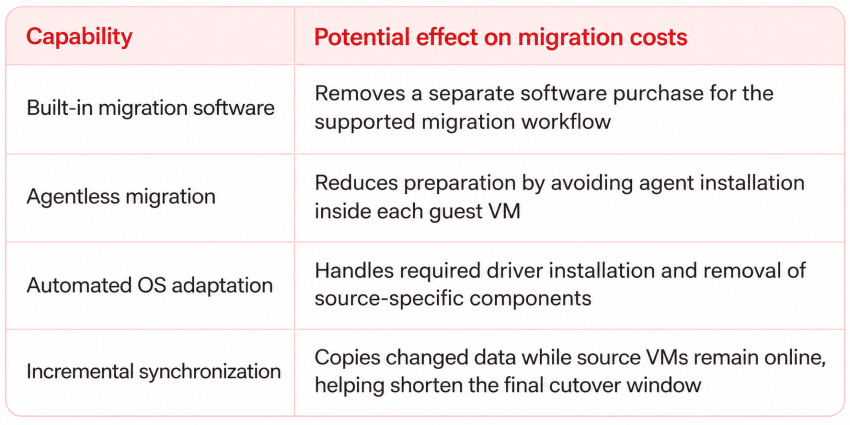
The workflow also supports repeated replication before deployment, allowing teams to synchronize data ahead of the planned switchover. More of the transfer can happen while the source workload is still available.
The transition plan determines when savings start
A phased migration allows workloads to be moved and validated in groups, with the sequence aligned to business priorities and the retirement of the VMware environment. Advanced Hosting’s engineers routinely help organizations plan these transitions, prepare the destination infrastructure, and support implementation. The guiding principle of these complex migrations is that the scope is absolutely tailored to the customer’s requirements and internal resources. That means every time the approach is different, and effective coordination is always crucial from a cost and budgeting standpoint.
Moving the first group of VMs may begin reducing work on the source platform, while larger savings arrive when hosts, software commitments, or supporting contracts can be retired. The migration schedule should account for those milestones.
The financial forecast also needs to distinguish project expenses from the cost of running both environments during the transition. Assessment, conversion, and testing contribute to the initial investment; temporary destination capacity and continued source charges determine the cost of the overlap period.
Two proposals with the same annual operating cost can therefore produce different three-year results if one requires more conversion work or a longer period of parallel operation. Provider expertise and migration tooling can help streamline that work, reducing the initial investment that future savings need to recover.
Preserving Reliability While You Move to OpenStack
An OpenStack-based cloud can fully preserve storage resilience, automatic recovery, and direct control over your environment while reducing VMware-related spending. But the capabilities included in the destination service – and the support behind them – determine how that translates into business continuity.
Three factors deserve special attention.
Storage resilience. Protection against disk or server failure remains important as workloads move to another platform. Storage replicated across multiple nodes can keep data available through other replicas when hardware fails, bringing that protection into the cloud environment. Replication supports availability; backup arrangements address a separate recovery requirement.
Automatic recovery. When a compute node fails, automatically restarting affected VMs on healthy nodes reduces the need for someone to initiate recovery manually. The restart still involves an interruption, so the business significance depends on how quickly applications can return to service. For a VMware customer, this provides a concrete recovery capability to assess against existing availability requirements.
Control and support. Businesses with established technical teams typically prioritize control. For these organizations, a self-service cloud model preserves direct oversight over resources and application environments while the provider manages the underlying infrastructure. This setup empowers internal teams to dynamically adjust configurations and capacity as their requirements evolve.
So, How Much of the VMware Package Does Your Business Need?
A VMware renewal review can establish the scope of a less expensive alternative: the capabilities needed to sustain existing services and support planned growth. Separating those requirements from features the business may never use makes the potential savings easier to assess.
Turn the feature review into a defined requirement
The assessment should connect each capability to a business need and show how it affects the proposed environment.
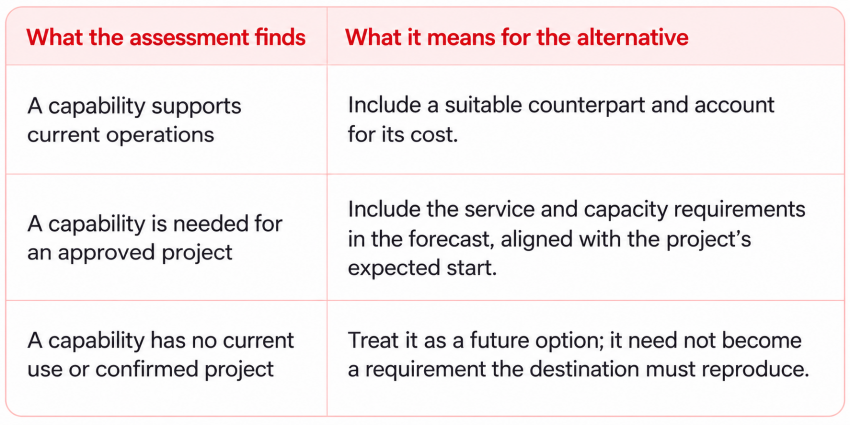
An unused feature can remain outside the replacement scope, while a capability supporting an important service receives explicit attention – even if it operates quietly in the background.
Price that scope within an OpenStack-based service
A resource-priced OpenStack-based cloud translates those requirements into compute, memory, storage, networking, and supporting services. The assessment therefore informs what gets priced. Current workloads establish the initial allocation; approved projects inform the growth forecast. Exploratory initiatives can be evaluated as additional scenarios, giving the business visibility into their potential cost before committing to them.
Use the result to establish the savings
The resulting proposal can be compared with the VMware renewal and its associated infrastructure expenses over the same period. Where it meets the defined requirements at a lower TCO, the business has a financial case for moving while preserving the capabilities it relies on.
That makes the review useful: it turns a broad platform comparison into a proposal for the environment the company actually needs.
Discuss your current workloads and planned requirements with Advanced Hosting’s Cloud Architect team
VMware vs. OpenStack: The Verdict
Moving beyond VMware creates an opportunity to lower recurring spending while preserving the capabilities the business relies on. Total cost of ownership shows the size of that opportunity: how much the organization will spend on infrastructure, software, support, and internal operations over the next three to five years, including the cost of getting there.
The migration investment affects when savings begin. The resource allocation, included services, and division of responsibilities determine how those savings develop. Together, they establish the financial case for the move.
For business leaders, the useful outcome is a clear comparison between the cost of continuing with VMware and the cost of running the required environment on an OpenStack-based service. Both forecasts should support the same business requirements and account for expected growth.
Advanced Hosting’s Cloud Architect team can help define a configuration around your workloads, existing infrastructure, and connectivity needs, with migration and implementation support discussed as part of the scope. That provides a concrete proposal to use in your TCO comparison.
How does an OpenStack-based cloud compare with VMware on cost?
An OpenStack-based cloud offers an opportunity to reduce recurring spending by changing how software and infrastructure are purchased. For VMware customers, the benefit can come from replacing subscription expenses, obtaining capacity in smaller increments, and using included capabilities that replace separate costs. A multi-year TCO comparison shows how those advantages translate into savings for a particular environment.
What should businesses include in a VMware vs. OpenStack TCO comparison?
A useful comparison includes software, infrastructure, support, internal operational work, and the initial cost of migration over the same three-to-five-year period. Both options should support the same business requirements and expected growth. This gives decision-makers a consistent basis for assessing the financial benefit of moving, including when existing expenses can be retired.
How does migration affect the savings from leaving VMware?
Migration determines how quickly lower recurring spending becomes a net saving. Built-in tooling can reduce separate software purchases and automate parts of the transition, while a coordinated migration plan can help limit the period of parallel operation. Aligning workload moves with renewal dates and infrastructure retirement makes the expected payback easier to forecast.
Can businesses retain their existing applications when moving from VMware?
Compatible virtual machines can be migrated while preserving their established application environments. This allows businesses to change the underlying infrastructure while keeping existing services central to the plan. Migration tools can handle parts of the operating system adaptation, with workload assessment and validation helping establish the right approach for each application.
Can lower infrastructure costs coexist with reliable service?
Yes. An OpenStack-based cloud can combine lower spending with storage resilience, automatic VM recovery, and technical support. The article’s examples include replicated storage that protects data availability and automatic restarts on healthy compute nodes after hardware failure. Assessing these capabilities against existing service requirements helps establish how the destination will support business continuity.