Log in


Maximizing a virtual machine’s performance depends almost entirely on how the underlying infrastructure is set up. Get the configuration right, and a KVM virtual machine can run at 89 to 91% of the speed of the physical server it sits on. Get it wrong, and that same hardware can deliver 25 to 50% less performance because of a handful of avoidable configuration gaps.
Those gaps fall into four areas: how the virtual machine’s CPU is scheduled, how its storage is connected, how its network traffic is handled, and how its memory is mapped. This guide walks through each one, explains why it matters, and shows what a correctly configured private cloud actually looks like.
CPU scheduling and NUMA topology
By default, a virtual machine’s CPUs (called vCPUs) are treated by the host like any other software process. The host is free to move them between physical cores, pause them, or place them far from the memory they need. Every time that happens, the workload inside the VM experiences a small delay. Individually, these delays are tiny, but for anything sensitive to timing like a database, a trading system, or a real-time application, they add up to inconsistent, unpredictable performance. The fix is to make the virtual machine’s execution look as close to running directly on physical hardware as possible.
This is where NUMA comes in. NUMA stands for Non-Uniform Memory Access, and it describes how modern multi-core servers are built. Instead of one shared pool of memory, each processor has its own local memory bank that it can reach quickly, plus access to other processors’ memory that takes longer to reach. A CPU reading from its own local memory takes roughly 70 to 100 nanoseconds. Reading from another processor’s memory takes 130 to 200 nanoseconds or more; often close to double. If a VM’s CPUs and its memory end up on different NUMA nodes, every single memory access pays that penalty. Keeping them aligned is one of the simplest, highest-impact changes you can make.
What vCPU pinning actually does
vCPU pinning locks each virtual CPU to one specific physical CPU core, permanently. This removes the overhead of the host constantly deciding where to run each vCPU, and it means the VM keeps using the same CPU cache instead of losing it every time it gets moved.
On KVM systems that use libvirt, this is set with the <vcpupin> tag in the VM’s configuration, and it should always be paired with <numatune>, which tells the host to keep that VM’s memory on the same NUMA node as the cores it’s pinned to. These two settings have to be applied together: pinning the CPU without also pinning the memory just moves the bottleneck rather than fixing it.
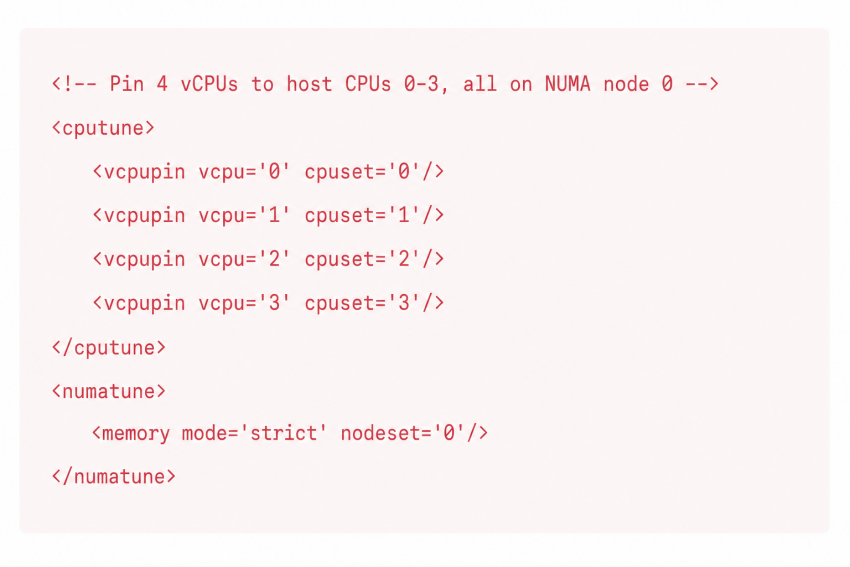
To see which physical cores belong to which NUMA node on a given server, you can use lstopo or numactl –hardware. These show which cores share a memory bank, which is the map you need before deciding how to pin anything.
For workloads with strict latency needs, there’s one more step: isolating the pinned cores from the rest of the host using the isolcpus kernel boot parameter. This stops the host’s own background processes and interrupt handling from landing on those cores and knocking the VM’s data out of the CPU cache.
Pinning vCPUs and aligning memory to the same NUMA node are two halves of the same fix. On their own, each helps a little. Applied together, they’re the foundation of predictable, low-latency VM performance.
Put high-performance virtualization on infrastructure built for it
Storage: Choosing the Right Path From VM to Disk
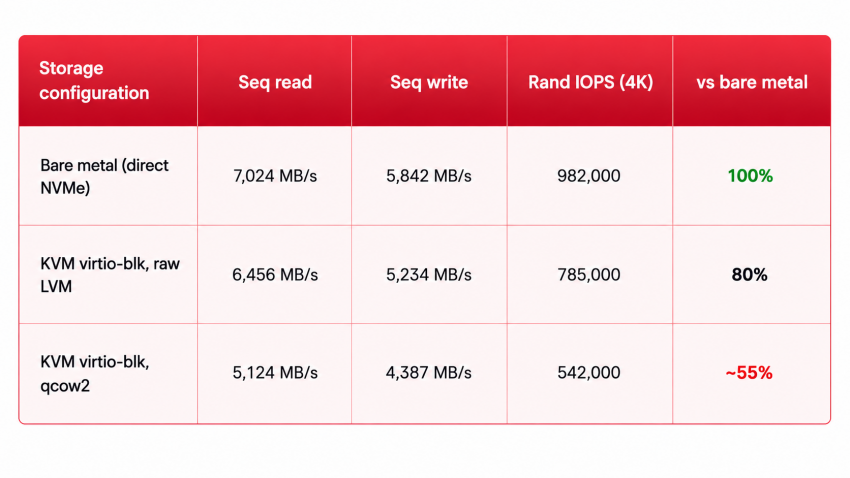
How a VM’s storage is connected to the underlying hardware has a bigger impact on performance than most default configurations assume. KVM using virtio-blk on top of a raw LVM volume reaches 91.9% of bare-metal sequential read throughput and 89.6% of write throughput. For random IOPS (the number that actually determines how a database performs), that same setup reaches around 80% of bare metal. Those numbers assume a correctly configured storage path. Add unnecessary layers on top, and they drop noticeably.
Take the qcow2 image format as an example. It adds copy-on-write behavior, a metadata layer to track disk space, and an extra layer. For a production database or anything write-heavy, it’s the wrong choice. Hence, a plain, raw block volume is best. So, the storage path is important.
To maximize VM performance, you must make excellent decisions regarding how efficiently an I/O request travels from the VM to the host’s storage. Controllers, iothreads, and the async I/O mode are the three settings you must not leave to chance.
For high-IOPS workloads, Virtio-blk with a dedicated iothread is the standard recommendation. The iothread moves I/O handling out of QEMU’s main process and into its own thread, so storage work and CPU work aren’t competing for the same thread. For workloads where storage latency really is the deciding factor, VFIO NVMe passthrough goes a step further: it hands the physical NVMe device directly to the VM, skipping the virtio layer entirely. Research on this technique, published as LightIOV, shows this kind of passthrough getting IOPS performance close to native hardware, provided the device is dedicated to a single VM. That trade-off makes sense for high-frequency trading systems, latency-critical databases, and similar cases where every microsecond in the storage path counts.
For the async I/O mode, aio=native is the setting to use on NVMe-backed storage running kernel 5.15 or newer (which covers Proxmox 8.x and 9.x). Pair it with cache=none, which bypasses the host’s page cache entirely and writes straight to the storage device; this produces the steadiest, most predictable write latency.
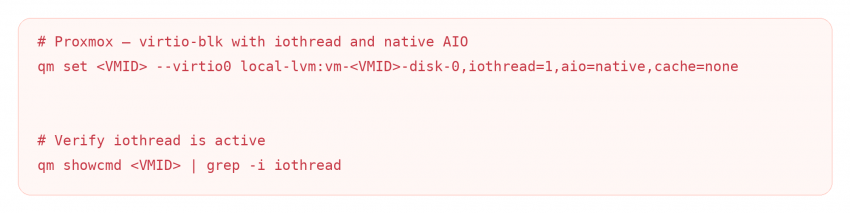
A VM configured this way on NVMe storage typically reaches 150,000 to 200,000 random read IOPS with sub-millisecond latency at the 99th percentile; comfortably enough for production databases and other high-throughput workloads.
A correctly configured KVM storage stack: raw block volumes, a dedicated iothread, native AIO, and direct writes with no host caching reaches 80 to 92% of bare-metal storage performance, depending on the workload. In fact, GnTech’s Proxmox tuning guide notes that such targeted changes to controller, iothreads, cache mode, and async I/O can double or triple a VM’s disk throughput on the same hardware, with no extra spending.
Networking: virtio-net vs. SR-IOV
Which network model to use isn’t a one-size-fits-all decision. It depends on what the workload actually needs. Virtio-net is the right default for most VMs. Its overhead compared with bare metal is only around 2 to 5%, and it supports live migration, letting a VM move between hosts without downtime. That flexibility matters for a lot of general-purpose workloads.
With virtio-net, every packet travels through the host’s software bridge and network stack before it reaches the physical network card. That adds latency that scales with how busy the host is, and it caps out at roughly 30% fewer packets per second than bare metal under benchmark conditions.
Hence, for cases where consistent, predictable latency matters more than migration flexibility (iGaming platforms, financial transaction processing, real-time streaming), SR-IOV is the better fit.
What SR-IOV changes
Single Root I/O Virtualization (SR-IOV) gives each VM its own dedicated slice of the physical network card, called a virtual function, and lets it talk to the network directly, bypassing the host’s software stack entirely. The card presents itself as multiple separate PCIe devices: one physical function for the host to manage, and up to several hundred virtual functions that can be handed straight to VMs. Traffic goes from the VM to the wire without the hypervisor sitting in the middle.
The latency difference is substantial. Research from the Technical University of Munich, summarized by ScienceInsights, found SR-IOV delivers roughly 40% lower latency than software-based networking (virtio-net) for small messages under 1 KB: about 40 microseconds round-trip versus 65 microseconds for fully virtualized networking. That puts SR-IOV’s average latency at around 113% of bare metal, which is close enough to native to matter for the most latency-sensitive applications.
This holds up at scale, too. Published research on the original SR-IOV architecture (Dong et al., presented at IEEE HPCA) showed SR-IOV sustaining 9.48 Gbps line-rate throughput across 60 simultaneous virtual machines, with only 1.76% additional CPU overhead per VM.
The trade-off with SR-IOV is migration. SR-IOV VMs are tied to a specific virtual function on a specific physical host, so they can’t be live-migrated the normal way. That makes SR-IOV the right choice for stationary, performance-critical workloads, and virtio-net the right choice for anything that needs to move between hosts for maintenance. In practice, most production environments run both: SR-IOV for the latency-sensitive workloads that stay put, and virtio-net for everything else.
Get a VM built for consistent performance
Memory configuration: huge pages and TLB efficiency
Every time a virtual machine accesses memory, that request goes through two rounds of translation: first, the guest operating system converts its own virtual address into what it thinks is a physical address, then the hypervisor converts that into the real physical address on the host. Each layer has its own cache (called a TLB, or translation lookaside buffer) to avoid repeating this work. But when both caches miss at once, the CPU has to walk through both sets of page tables to work out the real address; which can mean up to 24 separate memory lookups for a single access, compared to just one on a machine with no virtualization at all.
This gets worse as VMs get bigger. Under the standard 4 KB page size, a 32 GB VM needs more than 8 million page table entries; far more than any CPU’s TLB cache can hold on to. Once a workload’s memory footprint is bigger than the TLB, the CPU starts missing constantly. Research using hardware performance counters found that switching to huge pages cuts TLB misses by roughly a factor of ten and reduces the cost of a page table walk by up to 40%.
Static huge pages vs. transparent huge pages
A 2 MB huge page covers 512 times as much memory as a standard 4 KB page, so the same TLB cache can now hold a much bigger working set without missing. For memory-heavy workloads, this typically translates into a 10 to 30% performance improvement.
Transparent Huge Pages (THP) let the kernel automatically upgrade regular 4 KB pages to 2 MB pages in the background. Static huge pages, by contrast, are reserved up front at boot time, exclusively for the processes that ask for them.
For production VMs, static allocation is the more reliable choice. THP’s background process causes latency spikes that are especially disruptive for databases.
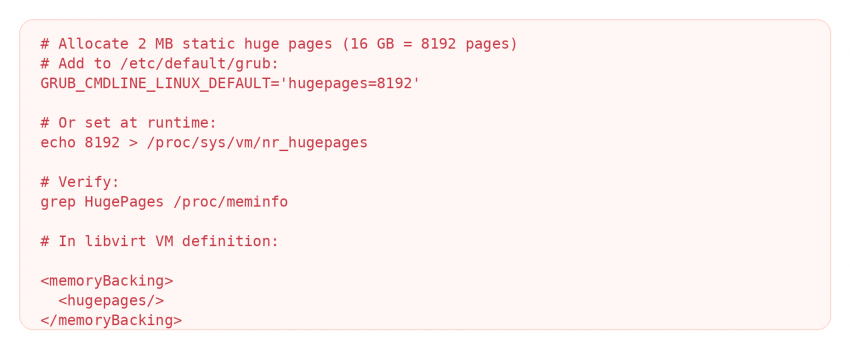
On the host, THP is generally best set to madvise mode, which lets applications explicitly request huge pages when they want them, without the kernel opportunistically promoting pages in the background and triggering the compaction that causes latency spikes. And just like NUMA settings, the <memoryBacking> element has to be set explicitly for each VM. For any production VM with 8 GB of memory or more running a database or in-memory cache, this single setting is one of the highest-impact changes available.
Why These Four Settings Have to Work Together
None of these four areas (CPU scheduling, storage, networking, and memory) deliver their full benefit in isolation. These optimizations reach their full effect only when they’re applied together, as one coherent configuration rather than a checklist of independent settings.
When all four are correctly aligned: vCPUs pinned to NUMA-local cores and isolated from the host scheduler, memory bound to that same NUMA node and pre-allocated as static huge pages, storage running on raw block volumes with a dedicated iothread and native AIO, and SR-IOV networking on a card that shares the same PCIe root complex as the pinned cores, KVM reaches 89 to 91% of bare-metal transactional throughput, with 95th-percentile latency running only 14 to 17% above bare metal.
That’s what properly specified hardware, correctly configured, delivers in practice.
Conclusion: What Drives Virtual Machine Performance
Virtual machine performance depends on the entire infrastructure stack. CPU scheduling, storage, networking, and memory configuration all influence latency, throughput, and consistency. The best results come when these elements are designed and configured to work together around the needs of the workload.
The underlying hardware matters too. Modern processors, fast memory, enterprise storage, and resilient infrastructure give virtualization a stronger foundation to work from.
For teams looking for a ready-to-run option, Advanced Hosting A/VMs provide guaranteed resources on enterprise cloud infrastructure, with AMD EPYC processors, DDR5 memory, NVMe storage, and automatic failover.
What is vCPU pinning, and when should you use it?
vCPU pinning locks each virtual CPU to a dedicated physical core, removing the overhead of the host constantly reassigning it and letting the workload keep consistent access to the CPU cache. It’s used for latency-sensitive production workloads and should always be combined with NUMA-aware memory allocation using numatune in libvirt. Together, CPU pinning and NUMA memory binding are what give a VM execution behavior close to dedicated hardware.
What is NUMA, and why does it matter for VM performance?
NUMA (Non-Uniform Memory Access) describes how multi-socket and modern many-core servers are built: each processor reaches its own local memory faster than it reaches another processor’s memory. Keeping a VM’s CPUs and memory on the same NUMA node means every memory access stays local.
What’s the performance difference between qcow2 and raw block volumes in KVM?
Raw LVM volumes with virtio-blk reach roughly 80% of bare-metal random IOPS and about 92% of bare-metal sequential read throughput. qcow2-backed VMs land closer to 50-55% of bare-metal random IOPS. The gap comes from qcow2’s extra layers for copy-on-write and metadata tracking. Raw volumes are the right call for production databases and write-heavy workloads; qcow2 makes more sense where snapshotting and portability matter more than raw speed.
What is SR-IOV, and which workloads benefit from it?
SR-IOV gives a VM direct access to a dedicated slice of the physical network card, bypassing the host’s software network stack entirely. It averages around 113% of bare-metal latency, compared with roughly 207% for standard software-virtualized networking, and it actually beats bare metal’s worst-case latency at the 99th percentile. It’s the right fit for workloads that need consistent, sub-millisecond network latency, such as iGaming, financial transactions, and real-time streaming. Because SR-IOV VMs are tied to a specific physical network function, they can’t be live-migrated, so it suits stationary, performance-critical workloads rather than VMs that need to move between hosts.
What are huge pages, and how much do they actually help?
Huge pages are 2 MB or 1 GB memory pages used in place of the standard 4 KB page. A single 2 MB huge page covers 512 times as much memory, so the CPU’s translation cache can hold a much bigger working set without missing. Research shows huge pages cutting TLB misses by roughly a factor of ten and reducing page-walk latency by up to 40%. For memory-heavy workloads with 8 GB or more allocated, that typically means a 10-30% performance gain. Static huge pages are more consistent than transparent huge pages for databases, since THP’s background compaction can cause latency spikes.
How close can a properly tuned KVM VM get to bare-metal performance?
A KVM VM with vCPU pinning, NUMA-aligned memory, static huge pages, raw block storage with iothread and native AIO, and SR-IOV networking reaches 89-91% of bare-metal transactional throughput, with 95th-percentile latency around 14-17% above bare metal. That’s the performance profile of a correctly configured private cloud, and the gap that remains is the one inherent to virtualization itself, not the much larger (and entirely avoidable) gap caused by misconfiguration.