Log in

AI summary
Overview: The piece analyzes the market reaction to Broadcom’s post-acquisition licensing changes for VMware — including a shift to subscription bundles, minimum-core licensing rules, and consolidated product tiers — and the resulting surge of interest in alternative virtualization and private cloud platforms ahead of the October 2027 migration deadline to VMware Cloud Foundation (VCF) 9.
Core message: Many organizations should evaluate replacement platforms or hybrid strategies: the right choice is determined by workload requirements, long-term total cost of ownership, team skills, and ecosystem maturity rather than a single universal substitute for VMware.
Primary drivers of the migration trend are substantially higher renewal costs, mandatory bundling and minimum-core licensing that can inflate payments for smaller or heterogenous environments, and uncertainty about future product availability and pricing under the new vendor ownership.
Retaining VMware remains valid for environments that depend on its most advanced capabilities — mature live migration and automated placement, NSX networking and microsegmentation, or vSAN-integrated storage — or for workloads constrained by regulatory or ISV support requirements.
Practical evaluation criteria include whether VMs can run on the target platform without extensive modification, the operational model and required engineering effort, a comprehensive TCO that includes migration and tooling, and the depth and reliability of vendor or community support and integrations.
Viable alternatives differ by profile: Proxmox VE for small-to-mid markets seeking low-cost KVM-based virtualization; OpenStack (self-managed or managed through third parties) for large, multi-tenant private clouds with deep architecture needs; Nutanix AHV as an enterprise HCI replacement offering integrated management and storage; Microsoft Hyper-V for Windows-centric estates; and Red Hat OpenShift Virtualization for teams consolidating VM and container operations under Kubernetes.
A phased migration approach is recommended: begin with noncritical, development, and stateless workloads, migrate Linux-heavy services before complex Windows/storage/network dependencies, and defer NSX- and vSAN-dependent systems until tooling and processes are validated. Partial migration can also strengthen commercial leverage during contract renewals.
In summary, VMware’s technology remains feature-rich, but changes in licensing economics and product packaging make it prudent for most organizations to assess alternatives and align platform choices to workload characteristics, operational capability, and long-term cost and support considerations.
When Broadcom acquired VMware in a $61 billion deal in November 2023, it moved customers from perpetual licences to mandatory subscription bundles, eliminated legacy discounts, and introduced 72-core minimum requirements for vSphere. Annual VMware costs have risen 8 to 15 times for some organizations.
As a result, Gartner says that 74% of IT leaders are now actively exploring alternatives, and projects that more than a third of VMware workloads will move to other platforms by 2028.
Forced bundling, pricing shifts, and a looming October 2027 deadline to migrate to VMware Cloud Foundation (VCF) 9 are forcing customers to a crossroads. For many IT teams, this deadline is a clear signal to reassess their virtualization strategy and look for alternatives.
This article explains which alternatives are worth evaluating, what each one is built for, and how to match your workloads to the right platform.
Why are companies looking for VMware alternatives?
Companies are looking for VMware alternatives because Broadcom’s post-acquisition licensing changes have made VMware significantly more expensive and less flexible. The three factors driving the movement are an increase in licensing costs, forced bundling and minimum core requirements, and long-term uncertainty.
- Licence cost increases: Broadcom eliminated perpetual licences and moved everything to subscription-based bundles. Many organizations now pay for features they do not use — (including vSAN, vRealize, NSX) because those features are bundled into the tier that covers their workloads. Renewals that were predictable are now producing proposals that some IT leaders describe as impossible to budget for. As a lead analyst at Forrester bluntly noted, this radical shift means customers are essentially being told, “You’re going to buy a bundle of software that includes a bunch of stuff you don’t want, and by the way, it’s going to cost 3x to 5x more than what you paid before.”
- Forced bundling and minimum core requirements: vSphere now requires a 72-core minimum per CPU under certain licensing tiers. For organizations running smaller environments or mixed hardware generations, this means paying for capacity that does not exist on their hardware.
- Long-term uncertainty. Broadcom has already shrunk the VMware product portfolio, eliminating some editions and consolidating others. Teams that built automation and integrations around specific VMware features now operate in an environment where those features could be removed, rebundled, or repriced at any renewal cycle.
Teams looking for VMware alternatives are looking for platforms that deliver comparable capability at a cost and licensing model that is sustainable over the next five to ten years.
Build private cloud infrastructure around your workloads
When is VMware still the right choice?
VMware is still the right choice for organizations that need its most advanced enterprise features and whose workloads depend on them specifically. Before evaluating alternatives, evaluate what you actually use:
- Does your operations team rely on vMotion and DRS? VMware’s live migration and automated workload balancing are mature in ways that open-source alternatives have not yet fully matched at scale. The same applies to NSX. Its microsegmentation, distributed firewall capabilities, and network virtualisation are difficult to replicate with alternatives. So, teams with complex NSX deployments must account for the full cost of rebuilding that networking layer before committing to any migration.
- Is your storage backed by vSAN? If yes, stick to VMware. vSAN’s integration with vSphere is tight, and replacing it means adopting an alternative hyper-converged storage layer like Ceph, or returning to a traditional SAN. Both options carry real migration risk.
- Is your organization operating in a regulated industry like healthcare and finance? If yes, before evaluating alternatives, consider how migrating your hypervisor may void the support agreements of your products with ISV certifications.
How should you evaluate VMware alternatives?
Evaluating VMware alternatives requires assessing workload compatibility, evaluating the alternative platform’s operational model, calculating the total cost of ownership (TCO), and examining the product’s long-term support and ecosystem depth.
- Workload compatibility: The first question is whether your existing VMs can run on the target platform without modification. KVM-based platforms can import VMDK-format VMs, but the process is not always seamless. Workloads with complex networking configurations or VMware-specific drivers require the most care. Validate your most critical workloads in a test environment before committing to an alternative.
- The operational model: Every platform imposes a different model on your team. Some platforms are best for Linux-comfortable administrators but lack enterprise orchestration depth at scale, some may require significant engineering investment, while others may require your team to manage more appliances than ever before. Be honest about what your team knows how to run and what they can realistically learn.
- Build the full total cost of ownership. Although licence savings from moving off VMware can be substantial, ensure the TCO truly checks out by including migration engineering time, retraining, new tooling, and replacing VMware-integrated backup and monitoring solutions into your TCO calculation. An open-source platform with zero licence cost may carry a higher operational cost than a commercial alternative with solid support coverage.
- Long-term support and ecosystem depth. VMware’s ecosystem of third-party integrations, backup vendors, and certified hardware is one of the most mature in the industry. Alternative platforms vary significantly. For example, Proxmox has strong community support but limited enterprise SLAs, while OpenStack has broad adoption but requires in-house expertise. Match the support model to your team’s operational capability.
The best VMware alternative is the one most compatible with your workloads, operates a model that matches your team’s specific skillset, has the lowest TCO, and has a mature ecosystem comprising vendors, integrations, and certified hardware.
What are the top 5 VMware alternatives to consider?
The best VMware alternative is the one whose infrastructure model fits your workload. The table below is a summary of the top 5 VMware alternatives and their best-fit use cases:
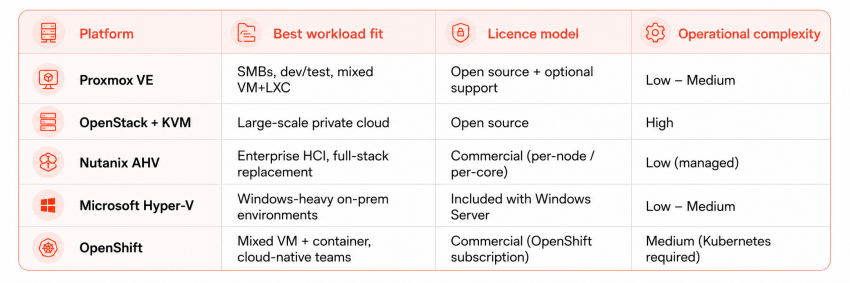
Here are the five platforms worth evaluating in greater detail:
1. Proxmox VE
Proxmox VE
Proxmox VE is an open-source virtualisation platform built on Debian Linux and KVM. It manages both KVM virtual machines and LXC containers through a single web interface, with a REST API that supports automation and integration with Terraform and Ansible.
Proxmox has no licence fee. Enterprise support subscriptions are available but optional, and even the paid tiers are a fraction of VMware’s per-core pricing. For organizations running 50 to a few hundred VMs without complex workload balancing requirements, Proxmox can replace vSphere without significant loss of functionality.
Proxmox supports ZFS out of the box, connects to Ceph clusters for distributed storage, handles traditional SANs over iSCSI and FC, and supports NFS and NVMe targets. You are not locked into a proprietary storage architecture the way vSAN creates dependency on VMware’s stack.
2. OpenStack + KVM
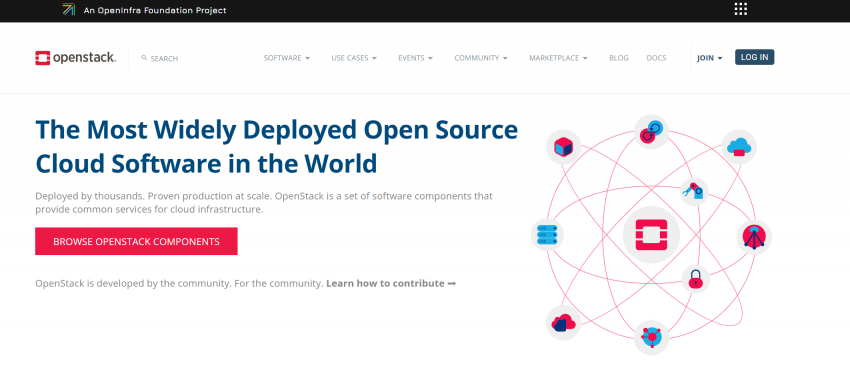
OpenStack Horizon dashboard — Project Overview.
OpenStack is one of the most powerful private cloud platforms available. It provides true multi-tenant isolation, hardware-accelerated networking via SR-IOV and DPDK, a modular service architecture, and an API surface close enough to AWS and Azure that workloads can be designed to run on either with minimal changes. As a VMware replacement, it is architecturally superior to most alternatives on this list.
The problem is running it. A production-grade OpenStack deployment requires dedicated cloud infrastructure engineers to install, configure, upgrade, and maintain. When OpenStack services misbehave, debugging requires deep platform knowledge across Nova, Neutron, Cinder, and Keystone simultaneously. Most organizations that have tried self-managed OpenStack have either hired a team to run it full-time, or quietly moved back to something simpler.
Advanced Hosting solves that problem. Through a partnership with Virtuozzo, Advanced Hosting manages a private cloud built on OpenStack handling the patching, upgrades, platform operations, and infrastructure management that make self-managed OpenStack impractical for most teams. You get the full architectural capability of OpenStack: dedicated server hardware, NVMe-direct storage paths, custom NIC configurations, GPU infrastructure for AI and video workloads, and Advanced Hosting’s own backbone network with direct peering relationships. What you do not have to do is staff and run the platform yourself.
3. Nutanix AHV
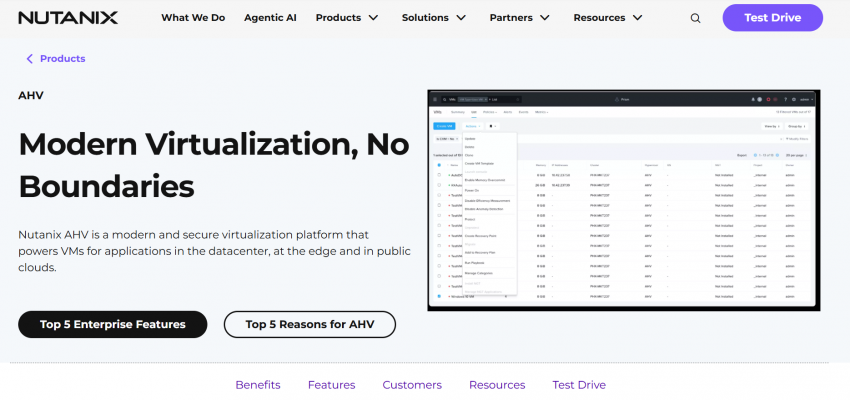
Nutanix Prism Central Infrastructure view.
Nutanix AHV is the hypervisor component of the Nutanix hyper-converged infrastructure (HCI) platform. It is KVM-based but managed entirely through Prism – a centralised interface that handles compute, storage, networking, and policy management from a single pane.
Nutanix is the most direct functional replacement for VMware at the enterprise level. Prism gives you VM lifecycle management, capacity planning, performance analytics, and a policy engine that covers the core operations vCenter handles on VMware.
Nutanix’s Distributed Storage Fabric (DSF) replaces vSAN with a distributed block storage layer that handles deduplication, compression, erasure coding, and replication natively.
4. Microsoft Hyper-V
Windows Admin Center — Hyper-V VM management.
Microsoft Hyper-V is a Type-1 hypervisor included with Windows Server. For organizations running primarily Windows Server workloads, it is often the path of least resistance: the licence is already included, the operational model is familiar to Windows administrators, and the integration with Active Directory, System Center, and Azure services is tight.
Hyper-V supports live migration, storage live migration, replica-based disaster recovery, and cluster-aware updating. For environments running 50 to 200 VMs, mostly Windows Server instances, without complex workload balancing requirements, it covers the core functionality well. If you are already licensing Windows Server Datacenter edition, the cost is effectively zero.
5. Red Hat OpenShift Virtualization
Red Hat OpenShift Console — Virtualization view.
Red Hat OpenShift Virtualization is a fundamentally different kind of VMware alternative. Where the other platforms on this list are hypervisor-based, OpenShift Virtualization runs virtual machines as native Kubernetes workloads using KVM and the KubeVirt project. Each VM is defined as a Kubernetes Custom Resource Definition and managed through the same control plane as containerised applications. That means consistent scheduling, networking, storage, and policy enforcement across both VMs and containers from a single platform.
Red Hat’s architecture suits organizations running both traditional VM workloads and modern containerised applications that want to manage them under one operational model. VMs do not need to be containerised. They run as they are, but gain the operational benefits of Kubernetes: declarative configuration, automated scheduling, horizontal scaling, and a consistent API surface across on-premises and cloud environments. Red Hat backs it with an enterprise SLA model, certified hardware partners, and a stable release cadence.
Get an OpenStack-based Private Cloud without the operational burden
Which VMware alternative fits your workload?
The right VMware alternative depends on what your workloads actually need. Here are six common workload profiles and the platforms that serve each one best.
- Enterprise virtualisation at scale
Large enterprise environments running hundreds or thousands of VMs, with complex HA, DRS-managed workload placement, and NSX-based networking, have the most demanding requirements. Nutanix AHV is the most direct functional replacement at this scale. The integrated HCI stack, Prism management interface, and enterprise support model cover the operational requirements that vCenter and vSAN offered. OpenStack is viable for organizations with a preference for open-source infrastructure, but it requires a dedicated cloud engineering team.
For teams that can not afford to staff the engineering team required to operate OpenStack, OpenStack + Advanced Hosting is the best alternative for this workload class. However, regardless of your choice, carefully plan the migration of NSX-dependent networking configurations, which is consistently the most complex part of a VMware migration at enterprise scale.
- SMB and mid-market environments
Small and mid-sized organizations running 10 to 200 VMs for general-purpose server workloads are the clearest targets for Proxmox. Proxmox handles this workload class well. ZFS storage integration covers the backup and snapshot requirements that most SMB and mid-market teams actually use. However, Microsoft Hyper-V is the right alternative for teams already invested in Windows Server.
- Windows-heavy workloads
Environments where the majority of VMs are Windows Server instances have a natural alternative in Hyper-V. The financial case is straightforward: if you are already licensing Windows Server Datacenter edition, Hyper-V is included. Moving Windows Server VMs from vSphere to Hyper-V is clean. The guest OS works well on both platforms, and V2V conversion tools from Microsoft handle the process reliably for most standard workloads.
- Streaming, media, and bandwidth-heavy infrastructure
Platforms that move large volumes of data continuously—video delivery, live streaming, content distribution—have requirements that most virtualisation platforms do not address at the infrastructure level. The hypervisor choice matters less than the network architecture underneath it. Advanced Hosting’s managed OpenStack private cloud, built in partnership with Virtuozzo, is the strongest fit for this workload class. Owned backbone infrastructure with direct peering means the bandwidth cost structure is fundamentally different from running equivalent workloads on a public cloud or standard co-location provider. And because Advanced Hosting manages the platform operations, streaming and media operators get that infrastructure advantage without hiring a team of OpenStack engineers to maintain it.
- Regulated and compliance-sensitive workloads
iGaming, financial services, and healthcare workloads often require infrastructure-level audit logging, hardware security module integration, and compliance certifications across multiple jurisdictions. For this workload class, the architecture that works best in practice is usually dedicated physical infrastructure for the most sensitive workload tiers, with managed private cloud handling the broader environment. This means OpenStack’s isolation model provides strong VM separation, while Advanced Hosting’s managed private cloud provides the physical infrastructure control and compliance documentation that regulated workloads often require.
- Kubernetes and container-native teams
Teams that have already moved most application workloads to Kubernetes and containers have different requirements from teams running traditional VM-based infrastructure. For container-native environments, the hypervisor is infrastructure plumbing. Proxmox, OpenStack, and Red Hat OpenShift Virtualization all support Kubernetes workloads well. OpenShift Virtualization is the strongest fit for teams actively adopting container-native development because it runs existing VMs alongside containerised workloads under a single Kubernetes control plane. Proxmox and OpenStack are better fits for teams that want to run Kubernetes clusters on top of a clean VM layer without moving to a full Kubernetes-as-the-control-plane model.
When does a phased migration make more sense?
A phased migration makes sense when some VMware workloads have clear, cost-effective alternatives while others are genuinely difficult to move. Running VMware alongside an alternative platform is operationally more complex than a complete migration, but it provides lower risk for most organizations. Here’s a guide you can follow:
- Start with development, test, and staging environments. These have the lowest migration risk and give your team the experience needed to handle production workloads confidently.
- Move stateless workloads and Linux-based services before tackling Windows Server environments or workloads with complex storage dependencies.
- Leave NSX-dependent and vSAN-heavy workloads for the final phase, after the target platform is validated and the team is operational on it.
The phased approach also gives you real data to negotiate your Broadcom renewal. A partially-migrated environment with a credible timeline to full migration is a stronger leverage than a theoretical evaluation. Some organizations also move enough workloads to establish credibility while negotiating better terms for the remainder.
Conclusion
VMware remains technically capable. vMotion, DRS, NSX, and vSAN are mature features that no open-source alternative has fully matched across all use cases. For organizations that use these features heavily, migration carries real risk and cost.
But most organizations do not use all of those features. The Broadcom pricing model now requires paying for the full VMware stack regardless. That is the fundamental problem, and it is why 74% of IT leaders are evaluating alternatives.
For organizations with bandwidth-heavy, regulated, or hardware-sensitive workloads, Advanced Hosting’s OpenStack-based Private Cloud is the alternative worth evaluating alongside the self-managed options. You get OpenStack’s full architectural capability without the engineering overhead of running it yourself.
What is the best VMware alternative?
The best option depends on your workload, operating model, and internal expertise. Proxmox suits many smaller environments, Hyper-V is a natural fit for Windows-heavy infrastructure, Nutanix AHV supports enterprise HCI, and OpenShift Virtualization works well for Kubernetes-led teams. Larger or more customized environments may benefit from an OpenStack-based Private Cloud.
How should companies compare VMware alternatives?
Start with workload compatibility, then compare operational complexity, migration effort, support coverage, and total cost of ownership. The platform with the lowest licence fee is not necessarily the least expensive once engineering time, retraining, monitoring, backups, and ongoing management are included.
Is moving away from VMware worth it?
It can be, particularly when licensing costs have increased significantly or bundled features provide little value. However, the potential savings should be weighed against migration costs, operational changes, and any VMware-specific capabilities that must be replaced.
Can existing VMware workloads be migrated to another platform?
Many standard virtual machines can be converted and moved to KVM-based or other virtualization platforms. Workloads that depend on VMware-specific drivers, networking, storage, NSX, or vSAN usually require more planning and testing.
When does a managed private cloud make sense?
A managed private cloud is worth considering when an organization needs dedicated resources, flexible infrastructure, or greater control but does not want to build and operate the entire cloud platform internally. It can be especially valuable for large-scale, bandwidth-heavy, regulated, or hardware-sensitive workloads.
What is the safest way to migrate from VMware?
A phased migration is usually the lowest-risk approach. Begin with development, testing, and stateless workloads, validate the new platform, and then move more critical systems. NSX-dependent, vSAN-heavy, and highly integrated workloads are generally best left until the final stages.
When should an organization remain on VMware?
Remaining on VMware may be the right choice when the environment relies heavily on vMotion, DRS, NSX, vSAN, or software that is certified only for VMware. In these cases, rebuilding the same capabilities elsewhere may cost more than continuing with the existing platform.
Should every workload move to the same VMware alternative?
Not necessarily. Different platforms may suit different workload groups, and a mixed environment can be more practical than forcing every system onto one replacement. The goal should be to match each workload with the infrastructure model that supports it most effectively.