Log in


AI summary
The article discusses the growing significance of video content in internet traffic, predicting that video applications will account for 82% of all internet traffic by 2026. It highlights the critical role of Content Delivery Networks (CDNs) in ensuring efficient video delivery, emphasizing that traditional CDNs often struggle with large video libraries due to issues like cache inefficiency and high costs associated with peak demand.
The core message is that a specialized video CDN architecture is essential for managing large video catalogs effectively. This architecture includes a two-tier delivery flow with a decision layer for routing and a delivery layer optimized for high throughput. It also advocates for demand-driven replication, which ensures that popular content is cached closer to viewers while minimizing storage waste on less popular files. Overall, the article underscores the need for CDNs designed specifically for video to enhance user experience and operational efficiency.
Video is the largest downstream traffic category. Video applications accounted for approximately 76% of all mobile traffic by the end of 2025, and they are projected to comprise 82% of all internet traffic by 2026. It’s also the category most sensitive to infrastructure speed.
If a page loads a little late, users get frustrated. If a clip starts with a delay, they leave. In fact, viewers begin abandoning when startup time goes beyond 2 seconds, and each additional second increases abandonment by ~5.8%.
Using a CDN for video delivery is the difference between a stream that starts instantly and one that buffers, stalls, and burns your audience (and your bandwidth budget) like a Christmas sparkler. It is a prerequisite to streaming success. The only caveat is – it’s got to be the right CDN – one explicitly designed to handle large files.
Why video delivery needs a CDN (and why large video catalogues break “traditional CDN” approaches)
CDNs accelerate delivery by serving content from edge nodes. But at a large library scale, classic “cache-on-first-request” behavior often doesn’t work for video: objects are too big, and there are too many of them, throughput is expensive, and long-tail catalogs churn the cache. That’s why video delivery needs a different placement model.
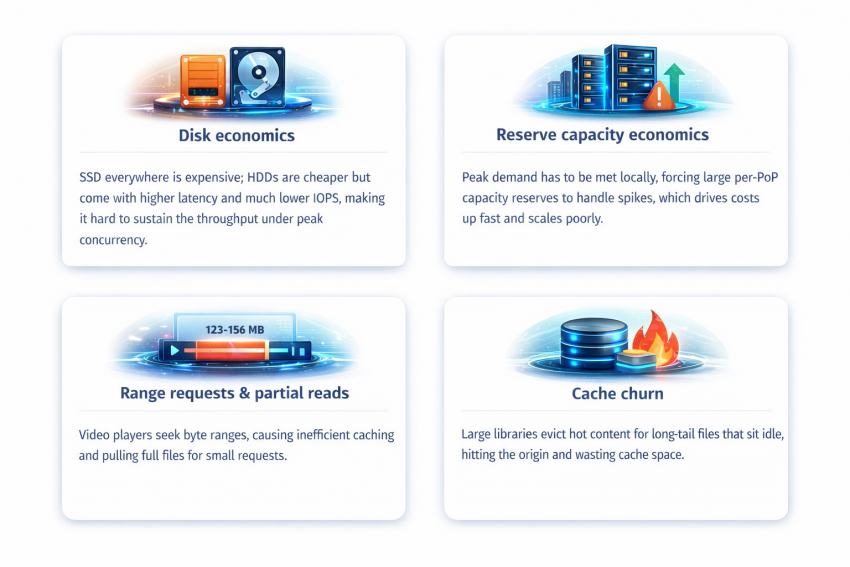
Traditional CDNs run into structural problems with big libraries:
- Disk economics: SSD everywhere is expensive; spindle disks (HDDs) are cheaper but come with higher latency and much lower IOPS, which makes it hard to sustain the throughput you need under peak concurrency.
- Reserve capacity economics: in architectures where traffic is effectively served “where the request lands,” peak demand has to be met locally. That forces providers to hold large per-PoP capacity reserves (uplinks + server headroom) to survive spikes, which drives costs up fast and scales poorly.
- Range requests & partial reads: video players don’t always fetch files linearly; they seek and request byte ranges. That hurts cache efficiency in two ways: different parts of the same file can have different popularity (but caching usually means storing the whole object), and a cache miss on a small chunk (say, a few MB) can trigger the system to pull and store the entire file (hundreds of MB), inflating storage usage and churn.
- Cache churn: when your library is tens or hundreds of terabytes, most of it simply can’t fit in edge cache. Even if the long tail is “only” a smaller share of total traffic, it still causes outsized damage: it hits the origin (because the files aren’t cached), it flushes the cache (the node has to evict hotter files to store whatever was just requested), and the newly cached long-tail files often sit idle until they’re evicted anyway. Net effect: edge storage gets consumed by content that doesn’t earn its place, and the cache’s effective usefulness drops sharply.
We should mention that if you already publish everything as small HLS chunks (which many platforms do), you can sidestep part of the problem – edge caches can hold the popular segments without swallowing entire large files. The issues arise when you’re dealing with big assets and big catalogs, where “cache it on first request” turns into churn.
Video-traffic advantage
Video is latency-sensitive at the edges – startup and seeks – but once playback is rolling, it’s mostly a throughput problem. Modern TCP can push high sustained rates even when the player and the server are far apart (higher RTT), as long as the delivery path stays uncongested.
That creates a design opportunity that “classic” CDNs don’t always take advantage of: active steering. Instead of passively hoping that anycast or GeoDNS lands the viewer on the best node, a video CDN can make a per-request decision – using HTTP redirects for file delivery, or crafting URLs inside HLS/DASH manifests for streaming.
This is exactly the kind of mechanism Advanced Hosting’s Video CDN is built around, and it’s why its architecture looks different from a generic “edge cache.” It’s not just about having PoPs – it’s about being able to pool capacity, avoid overload, and keep utilization high without breaking playback quality.
Switch to a CDN designed specifically for big video libraries
What “video-first CDN architecture” looks like
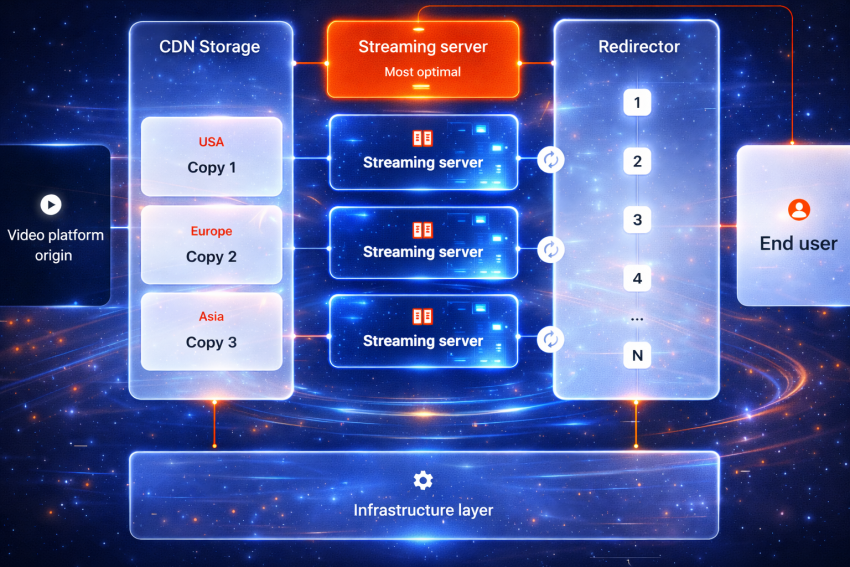
Continuing with the example of Advanced Hosting’s system, which is a good illustration, here are the two layers a video-oriented CDN has:
- Two-tier delivery flow: a lightweight decision layer (redirectors) that chooses the best delivery node based on geography and live load, and a delivery layer (edge nodes) optimized for high-throughput streaming.
- Demand-driven replication: content isn’t copied everywhere. Popular files are replicated closer to where they’re actually watched; cold files remain centralized until demand proves otherwise.
That combination targets the real video problems: startup time, stability under spikes, and cost efficiency for large libraries – the factors generic CDN configurations aren’t designed for.
Let’s zoom in: what exactly a video CDN does differently
Most CDNs were designed in an era when “content” meant small, cacheable objects: images, JavaScript bundles, CSS, and a few HTML pages. In that world, the default pattern works fine:
request arrives → nearest edge tries to serve → cache miss goes to origin → edge stores a copy
With video, users stampede the popular items and ignore most of the catalog. And video players don’t read files from byte 1 to byte N; they seek, resume, request ranges, and switch bitrate ladders. In that environment, a single-layer “cache everything at the nearest edge” can’t work effectively.
So, here’s what our video CDN does instead.
Redirectors: the decision layer (the “brain”)
The redirector is where the request lands first. It doesn’t try to push the entire video. It can’t. But it’s able to serve some small files, like manifests or some of HLS/DASH chunks, if that’s at least partially what the request calls for. More importantly, though, its job is to make a good routing decision.
The list (not complete) of considered factors looks like this:
- where the user is (geography),
- which delivery nodes are healthy,
- current disk/server/network load,
- and whether the request is for a plain file or a streaming workflow.
Then it responds with either:
- a 302 Found redirect to an edge node for file delivery, or
- a streaming manifest (HLS/DASH) that points the player to the right place to fetch segments.
Why this matters: the redirector traffic is relatively light compared to the traffic of actually streaming or downloading the video. That makes it a good fit for anycast routing: users hit a nearby entry point, and the system can fail over cleanly without making the delivery layer carry the routing burden.
In other words, the “thinking” is kept, fast, cheap, and resilient.
Edge nodes: the delivery layer
Once the viewer is pointed to an edge node, the edge does the heavy lifting: streaming or downloading content over HTTP(S).
This layer is built for throughput. And throughput is crucial, because video doesn’t just require “fast once” – it requires sustained delivery across thousands (or millions) of concurrent sessions.
A subtle but important point: we build edge nodes to run at high utilization safely, without overbuilding the PoP. This translates directly into faster performance for the client.
Demand-driven replication: “cache what proves it’s worth caching”
Now the real differentiator: it’s not enough to have edge nodes. The question is what content you place on them, and when.
With large libraries, naively caching everything at first request creates two predictable failures:
- You waste disk on cold content. (Most of the catalog.)
- You evict hot content too early. (Because the disk isn’t infinite.)
Demand-driven replication, which we’ve implemented, flips the default:
- popular files replicate closer to where they’re actually being watched,
- cold files stay centralized until demand justifies extra copies,
- and replication adapts as viewing patterns shift by region.
This is how we enable clients to avoid burning storage on the long tail while still improving startup time and resilience for what’s actually being watched right now. It’s closer to how cloud storage systems think about durability and placement than how old-school CDNs think about “edge cache.”
Streaming support: what the CDN does – and what it deliberately does not do
Up to this point, we’ve talked about where video should be served from (redirectors) and how it gets placed around the world (demand-driven replication). The next question is simpler:
What does the player actually request?
In modern video delivery, the browser usually doesn’t fetch one giant file. It starts by asking for a small “instruction file,” then pulls the video in small pieces.
That’s what HLS and MPEG-DASH are in practice:
- a manifest (think: a table of contents), plus
- a sequence of segments (small chunks of the video fetched over HTTP).
In this model, our CDN can do two useful things:
- Generate manifests on the fly (so the player knows what to request next).
- Repackage the file into a streaming-friendly structure so it can be delivered as segments cleanly.
And here’s the part that saves confusion later: repackaging is not transcoding.
People often mix these up because both sit “somewhere near video.”
- Repackaging is changing the container – the wrapping – so the same audio/video data can be delivered as streamable chunks.
- Transcoding is changing the content – re-encoding video/audio into different qualities or codecs.
So, what’s important to understand is that the CDN can make a file stream-ready, but it does not create new versions of the video for you.
If you need multiple bitrates (say 1080p + 720p + 480p), you still produce those encodes in your pipeline – and then the CDN can deliver them efficiently (including generating multi-bitrate manifests that let the player switch quality automatically).
This distinction is crucial because transcoding is a different category of cost and complexity entirely. Some platforms bundle it as part of an all-in-one video product. A delivery-focused CDN typically doesn’t. It’s better to know which world you’re choosing before you build around it.
Deploy Video CDN with built-in access control
Small features that matter operationally
Once streaming works reliably, the next pain is dealing with everything teams end up building around video delivery: previews, excerpts, language variants, special playback rules – the little things that turn into endless glue code and extra copies of files.
A video CDN is more useful when it removes that busywork.
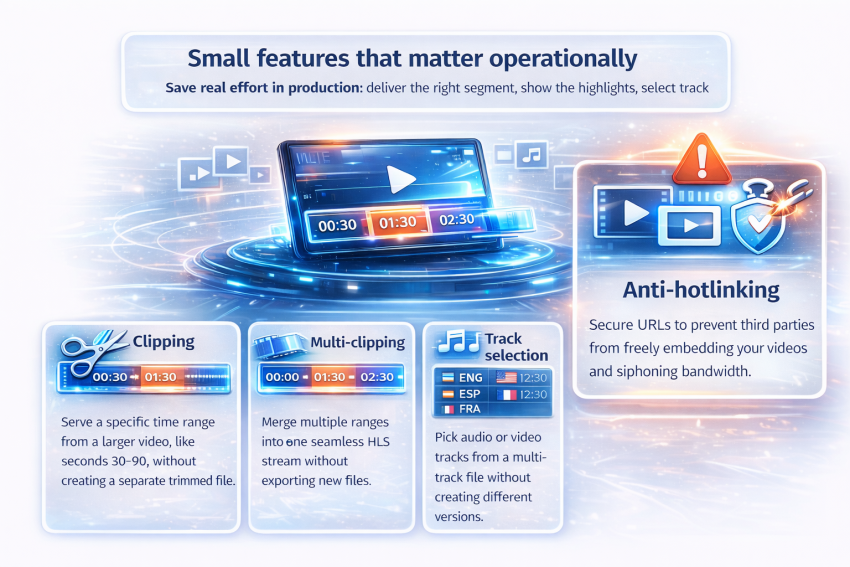
Here are three features that look small on a slide but save real effort in production:
Clipping
Serve only a specific time range from a larger video – for example, seconds 30–90 – without creating and storing a separate trimmed file. Useful for previews, trailers, or sharing a precise moment.
Multi-clipping
Same idea, but with multiple ranges stitched into one continuous playback flow (for HLS). Think: show the highlights without exporting a new “highlights.mp4.”
Track selection
If a file has multiple audio (or video) tracks, track selection lets the system deliver the most relevant one in streaming mode – so you don’t need separate files per language or track combination.
None of these features is meant to impress your CEO. They’re meant to keep your team from maintaining three versions of the same asset, writing custom endpoints to slice media, or bolting extra services onto the delivery path.
As for the more sophisticated features, Advanced Hosting’s video CDN provides anti-hotlinking (access control), which prevents third parties from embedding your video URLs and consuming your bandwidth outside your site. This is handled with delivery-layer controls like signed URLs (optionally time-limited), plus lightweight request validation (referrer/cookie checks) so links work for real viewers but break when they’re copied, tampered with, or reused in the wrong context.
Summing up this section, the main point is: once the delivery layer is solid, the best video CDNs are the ones that reduce the operational weight of running video at scale.
Conclusion: the “best CDN for video” is the one built for video’s worst days
There’s no way around it: if you’re delivering video at any meaningful scale, you need a CDN that’s built for heavyweight traffic. A CDN that was designed for small web assets and later “adapted” for streaming – won’t cut it.
Advanced Hosting’s video-first CDN avoids the usual failure modes of traditional setups by:
- separating routing decisions (redirectors) from throughput-heavy delivery (edge nodes),
- replicating based on real demand instead of blind caching,
- supporting HLS/DASH streaming without pretending delivery equals transcoding,
- and reducing operational busywork with practical tools like clipping and track selection.
If your platform is already feeling the pain – slow starts, unpredictable spikes, expensive origin scaling, or a library too large for naive caching – Advanced Hosting’s Video CDN is built to address those exact problems.
Reach out, and we’ll help you set it up fast: picking the right import method, configuring domains and SSL, tuning protection, and validating your streaming parameters. Then you can stop firefighting delivery – and keep viewers watching with ease.