Log in


AI summary
Overview: This guide explains how to design and operate a dependable backup and disaster recovery program for OpenStack, encompassing instance snapshots, persistent Cinder volume copies, control‑plane database and configuration exports, and protection of object and block storage. It emphasizes automated, live-capable capture methods, incremental replication where possible, and preservation of isolated backup repositories.
Core message: Robust OpenStack resilience depends on coordinated, multi‑layer backups across compute, storage, networking, and control services; secure, immutable and geographically separated targets; automated lifecycle management and monitoring; strict role separation; and regular, practiced recovery exercises to validate recoverability within defined RPO/RTO objectives.
Learn how to build a reliable OpenStack backup strategy for virtual machines, volumes, and cloud infrastructure. This guide explains how to create and restore snapshots, automate backups with CLI tools, protect Cinder volumes, secure control-plane services, and design a production-ready disaster recovery workflow for OpenStack environments.
How to Make Backups in OpenStack
Data loss inside a cloud environment rarely stems from a solitary hardware failure. In production environments, critical outages are typically triggered by cascading failures: storage corruption, accidental user deletion, failed microservice upgrades, database state inconsistencies, or asynchronous replication problems.
A reliable backup architecture ensures that customer workloads, persistent block storage, and foundational cloud services can be rapidly recovered without rebuilding the entire cluster from scratch.
An enterprise-grade OpenStack backup strategy must encompass virtual machine (VM) states, Cinder block volumes, system databases, control-plane configurations, internal networks, and object storage containers.
Why Multi-Layer Backups Matter in OpenStack
OpenStack is fundamentally a highly distributed cloud architecture consisting of independent, interconnected microservices. Unlike legacy, monolithic hypervisors, where a single centralized agent handles snapshots, OpenStack relies on decentralized components:
- Nova: Manages compute states and ephemeral instance storage.
- Neutron: Controls dynamic virtual networking topologies.
- Cinder: Orchestrates persistent block storage life cycles.
- Glance: Indexes and houses base virtual machine images.
- Keystone: Validates identity and manages centralized authentication tokens.
Because each service manages its own state, databases, and dependencies, an issue in one plane can isolate healthy parts of another. For example, if the centralized database or RabbitMQ messaging bus becomes corrupted, healthy virtual machines may suddenly become totally orphaned and inaccessible.
Production Backup Requirements
Before implementing a technical policy, storage administrators must clearly define these business and architectural metrics for the cloud:
| Parameter | Operational Definition | Production Target Example |
| Recovery Point Objective (RPO) | Maximum age of files that must be recovered from backup storage for normal operations to resume. | Less than 4 hours of data loss. |
| Recovery Time Objective (RTO) | Max duration of clock time allowed for infrastructure restoration before causing severe business disruption. | Complete service recovery under 2 hours. |
| Retention Policy | Documented lifespan rules determining how long historical copies remain stored before cycling. | 30 daily, 4 weekly, and 12 monthly cycles. |
| Data Isolation | Geographic and cryptographic separation of backup targets. | Cross-region replication on immutable storage. |
Understanding OpenStack Backup Architecture
Rather than relying on a single capture utility, backups in OpenStack operate across isolated storage and state layers. Understanding these layers allows cloud engineers to pinpoint exactly what needs restoration during an incident without unnecessarily rolling back unaffected infrastructure elements.
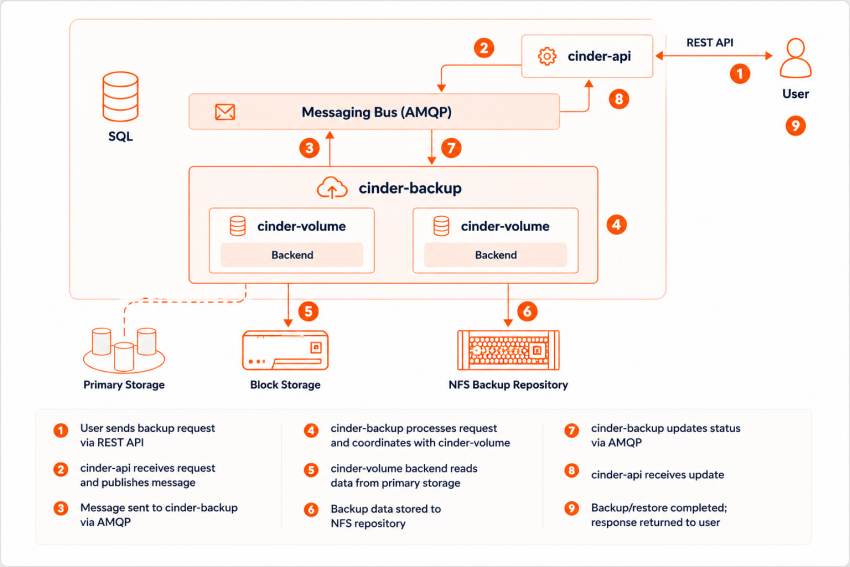
As illustrated above, when a user issues a backup request, the cinder-api validates the request and sends a message across the AMQP messaging bus. The dedicated cinder-backup manager then takes over, processing block layers directly from the backend volume storage to an isolated backup repository (such as NFS or external Object Storage).
The primary logical layers of a resilient OpenStack environment include:
- Nova Snapshots: Protect ephemeral VM disk states and instance metadata configurations.
- Cinder Backups: Safely copy persistent block storage independently of hypervisor states.
- MariaDB/Galera Dumps: Secure the structural control-plane metadata and state records of all running services.
- Ceph RBD Replication: Protects distributed, hyper-converged storage pools at the block tier.
- Swift Object Replication: Assures high availability for globally distributed file storage.
Instance Backups via Nova
An instance snapshot creates a point-in-time copy of an active virtual machine’s root disk. Nova processes these disk states and stores the finished image asset directly into the Glance registry so that identical workloads can be spun up anywhere across the cluster later.
Option A: Creating Snapshots via the Horizon Dashboard
For administrators handling smaller-scale environments or single instances, the graphical Horizon user interface offers a straightforward visual workflow:
- Log in to your dashboard and navigate to: Project → Compute → Instances.
- Locate your target virtual machine, expand the actions dropdown menu, and select Create Snapshot.
- Name your snapshot logically (e.g., prod-web-01-prepatch) and confirm.
- Monitor the processing state. The active image will be written to Glance; large root disks across traditional mechanical drives may take several minutes to completely process.
- Once complete, verify the image artifact exists under: Project → Compute → Images.
Option B: Command Line Interface Execution (Automated)
For production environments, the OpenStack Command Line Interface (CLI) is significantly faster, completely scriptable, and removes human error from schedule tracking.
To snapshot a running compute server instance, run:
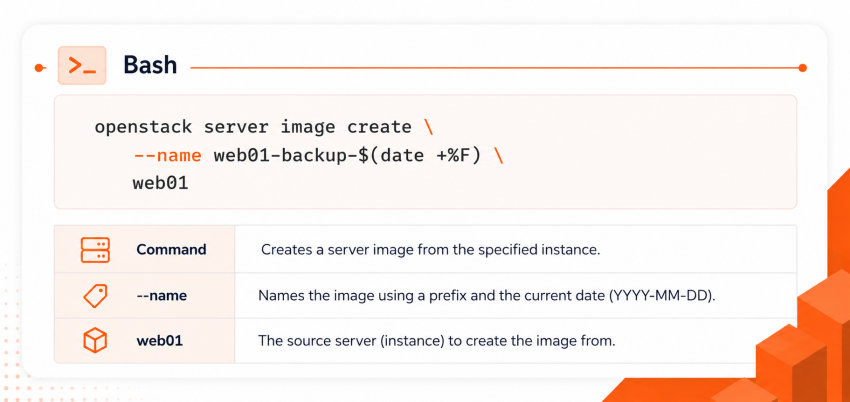
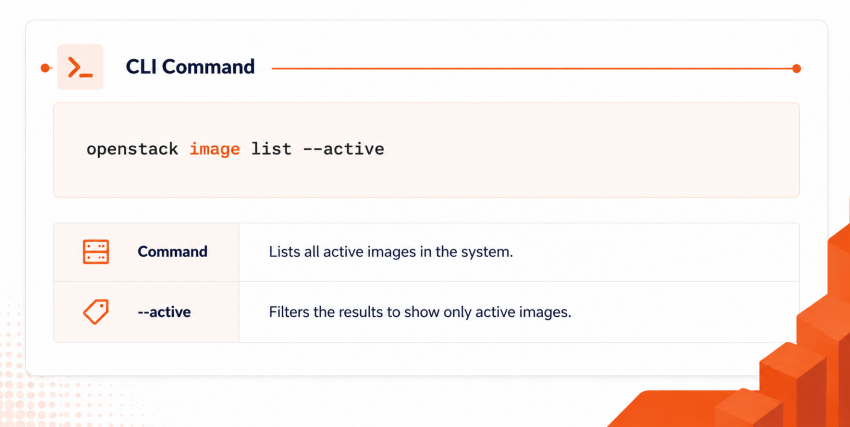
To list your available snapshot images and verify their status from the terminal, use:
Volume Backups with Cinder
A standard compute snapshot is fundamentally insufficient if your workloads rely on dedicated persistent block volumes. Database instances, transactional enterprise file systems, and production workloads write their structural updates directly to attached storage nodes rather than the ephemeral compute disk.
While a snapshot creates an internal pointer within the storage pool, a Cinder backup generates a complete, isolated copy of the volume’s raw data blocks into a distinct storage repository.
To back up a persistent volume via the CLI, pass the specific volume UUID to the Cinder client:
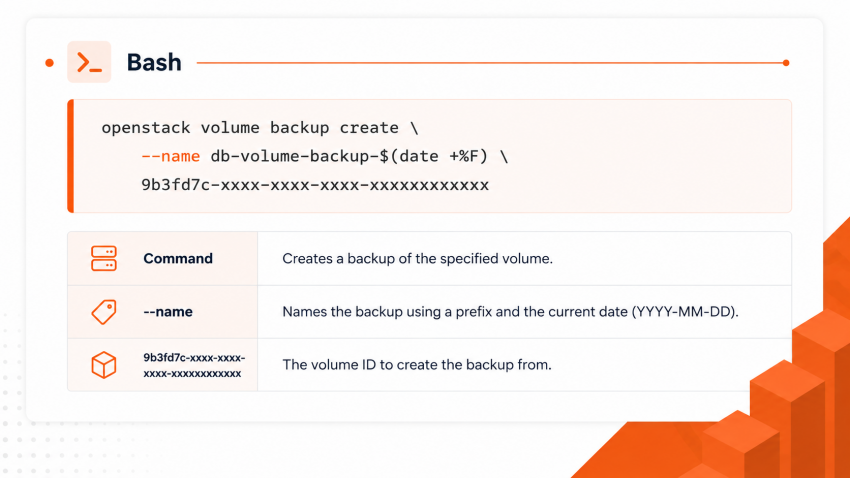
Production environments frequently utilize Ceph RBD as a Cinder backend storage target because it allows block devices to thin-provision, replicate efficiently, and take advantage of rapid copy-on-write operations.
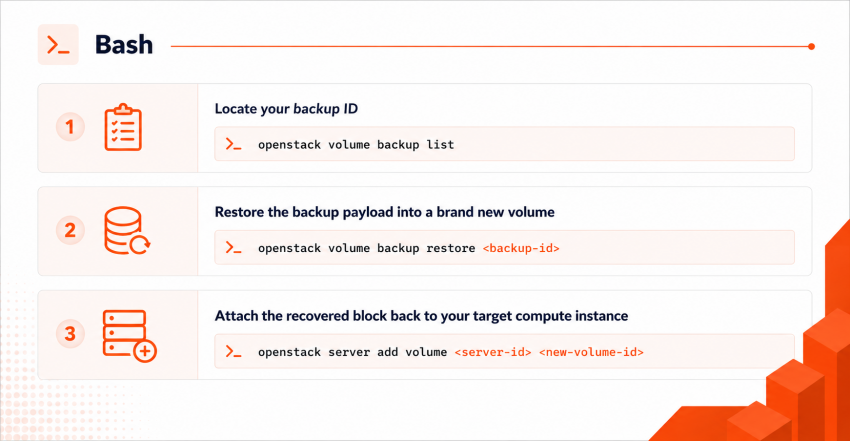
How to Restore Cinder Volume Backups
In disaster recovery conditions, it is generally safest to restore backups directly into an entirely new storage block. This preserves the compromised, corrupted, or older active volume for deep forensic evaluation or immediate operational rollback options.
To completely recover a volume from your repository, issue the following commands:
OpenStack Live Backup Methods
To maintain strict service availability, operations teams must implement live backup procedures that protect data without shutting down guest operating systems.
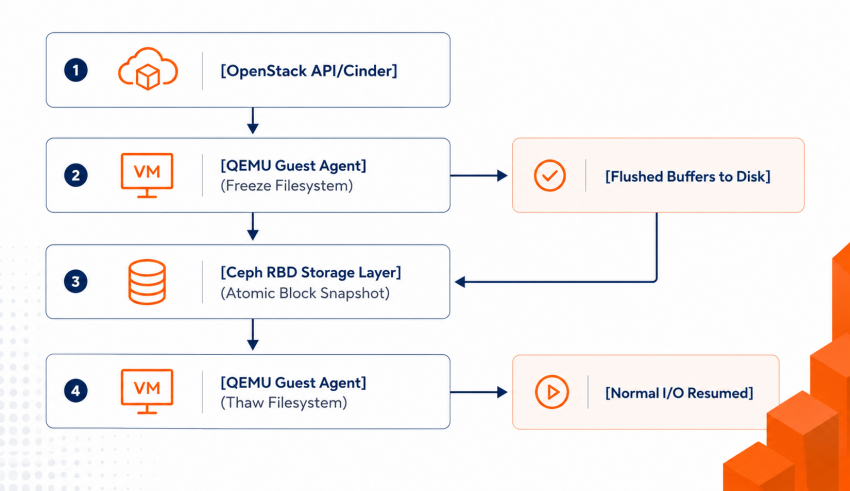
Executing atomic live backups without data corruption relies heavily on these specific platform capabilities:
- QEMU Guest Agent (QGA): An internal daemon running inside the virtual machine that receives control commands directly from the host hypervisor.
- Filesystem Quiescing: The process of temporarily flushing dirty memory buffers from RAM down to persistent storage and placing a brief write-lock on the file system.
- Incremental Block Tracking: Keeping tabs on changed data blocks at the hypervisor level since the last backup cycle run.
⚠️ Critical Data Warning
For high-throughput database operations (such as MySQL, PostgreSQL, or Oracle), a standard filesystem-level snapshot does not guarantee application consistency. You must leverage application-specific pre-backup scripts to flush internal transactional tables and commit active write-ahead logs (WAL) immediately before the storage sub-layer freezes blocks.
Implementing Incremental Backups
Full backups of massive enterprise cloud infrastructures generate unsustainable network traffic, require excessively wide backup windows, and run up immense capital storage costs. When utilizing a Ceph or Swift backend repository, Cinder supports native incremental block-level tracking.
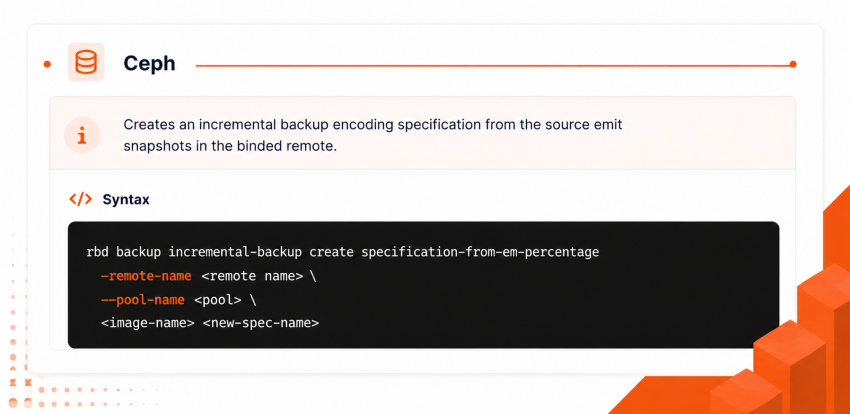
Using incremental models yields significant operational benefits:
- Drastically Shorter Backup Windows: Reduces time spent copying repetitive, unmodified infrastructure files.
- Minimized Traffic Footprints: Only altered blocks cross the production hypervisor network adapters.
- Reduced Storage Consumption: Lower overall total cost of ownership across your secondary backup infrastructure.
Note: Storage teams must routinely monitor the overall health of incremental backup chains. If an initial full master backup file suffers block corruption, the downstream child increments cannot be accurately read or reconstructed during a restore.
Automating Cloud Backup Lifecycles
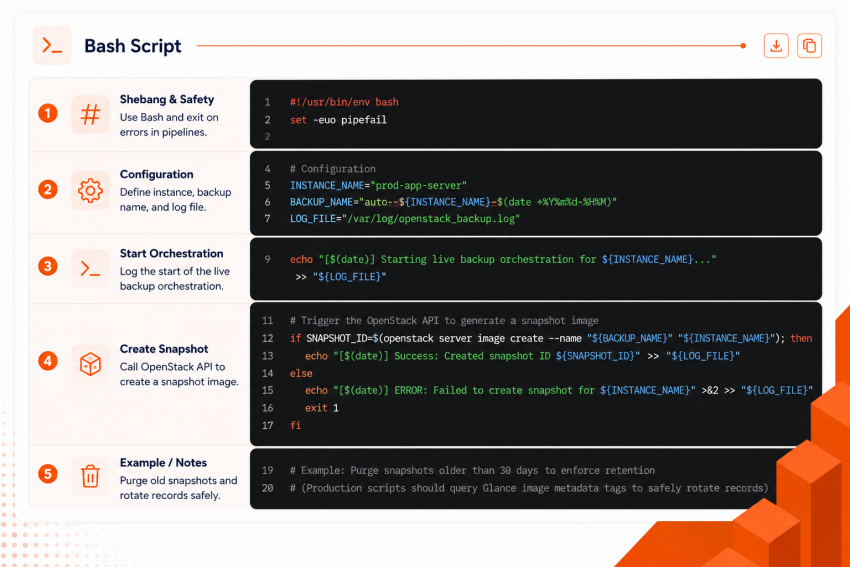
Manual backup operations inevitably fail due to human error. Production environments use automation frameworks to systematically schedule, execute, validate, and rotate cloud snapshots.
The script below demonstrates how to automate an instance backup, query its resulting metadata state, and cleanly handle programmatic retention logging:
Infrastructure Security & Monitoring Best Practices
Backup repositories are frequently targeted during security breaches. If an attacker gains administrative control over your cloud, they will often attempt to delete secondary storage pools first to eliminate your recovery options.
Security Implementation Checklist
- Enforce Encryption Everywhere: Ensure data blocks are fully encrypted at rest inside your repositories, and protect transit channels using TLS 1.3 across all storage network interfaces.
- Deploy Immutable Storage Policies: Leverage Object Lock mechanisms or write-once-read-many (WORM) storage modes within your Swift or S3-compatible endpoints to permanently protect files against ransomware modification.
- Isolate Backup Infrastructure Roles: Separate identity management cleanly. Your daily storage backup cron accounts should never possess global administrative privileges to tear down your compute hypervisors or storage clusters.
Production Monitoring Metrics
Do not assume your backup policies are functional simply because automated jobs are configured. Integrate an OpenStack Prometheus Exporter alongside a Grafana dashboard to monitor and alert on these vital infrastructure health signs:
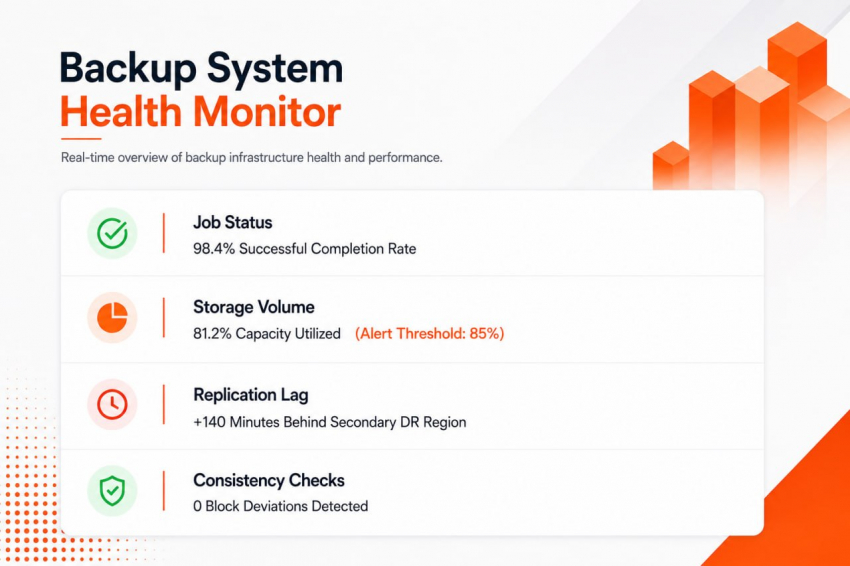
Structural Control-Plane Recovery Planning
A true enterprise disaster recovery design requires more than protecting individual guest VMs. If a catastrophic event takes down an entire data center, you must be capable of rebuilding the core cloud framework itself.
Ensure that your automated infrastructure backups systematically capture these fundamental control-plane configurations outside the primary cluster:
1. Configuration Registries
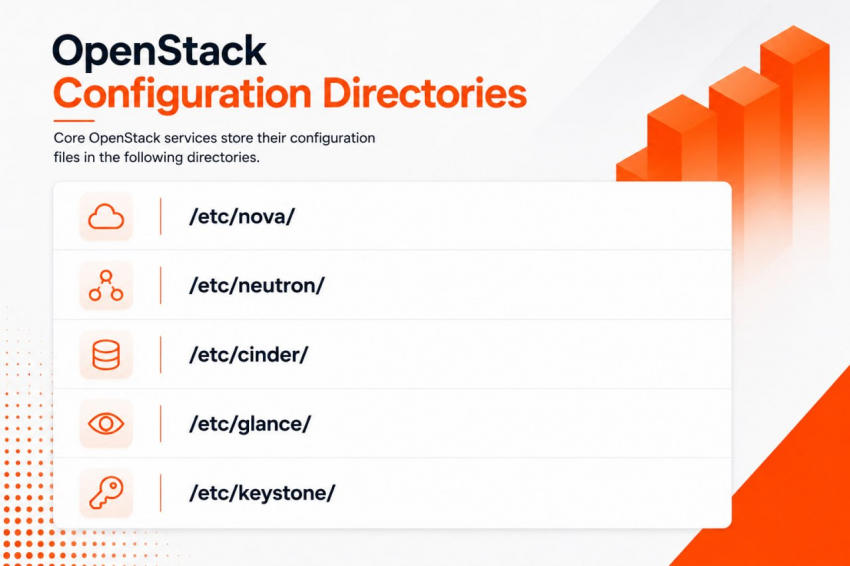
2. State Databases
- Complete logical or physical MariaDB/Galera database cluster dumps.
- RabbitMQ virtual host mappings and message queue topology configurations.
3. Hypervisor Mapping State
- Active Ceph monitor maps (monmaps), OSD states, and SDN (Software-Defined Networking) routing configurations managed by Neutron.
The Golden Rule of Resilience
An untested backup is an invalid backup. Conduct mandatory quarterly disaster recovery simulations. Spin up isolated, blank network sandboxes and practice reconstructing the control plane, importing configuration states, and recovering block volumes using only your off-site data assets.
Backups in OpenStack are not limited to snapshots. Reliable protection requires coordinated backup policies across compute, storage, databases, networking, and control-plane services.
An enterprise-grade OpenStack infrastructure backup approach combines:
- Automated snapshots
- Volume protection
- External replication
- Security controls
- Monitoring systems
- Recovery testing
The more distributed the cloud becomes, the more important backup validation and disaster recovery readiness become. In modern infrastructure operations, backups are not simply storage copies they are part of the platform’s overall resilience architecture.
What is the best OpenStack backup strategy for production environments?
A reliable OpenStack backup strategy should protect virtual machines, Cinder volumes, databases, control-plane services, and storage backends. Production deployments usually combine snapshots, external replication, automated retention policies, and regular disaster recovery testing.
Can OpenStack backups be automated?
Yes. Learning how to automate OpenStack backups is essential for enterprise infrastructure. Most organizations automate snapshots and volume backups using cron jobs, Ansible, Terraform, OpenStack SDK scripts, or orchestration pipelines.
How do I restore OpenStack volume backups?
Understanding how to restore OpenStack volume backups is critical during recovery scenarios. Administrators can restore backups through Horizon or the CLI by creating a new volume from an existing Cinder backup and attaching it to a VM.
What are OpenStack live backup methods?
Modern OpenStack live backup methods allow administrators to protect running workloads without significant downtime. Common techniques include Ceph snapshots, filesystem quiescing, hypervisor-assisted snapshots, and incremental block replication.
Does OpenStack support incremental backups?
Yes. OpenStack incremental backups reduce storage consumption by transferring only changed blocks after the initial full backup. This approach improves scalability and reduces backup windows in large environments.
Why is OpenStack backup monitoring important?
Effective OpenStack backup monitoring helps detect failed snapshots, storage issues, replication delays, and corrupted backup chains before recovery is required. Monitoring tools often integrate with Prometheus, Grafana, Zabbix, or Ceph telemetry.
How can organizations improve OpenStack backup security?
Strong OpenStack backup security practices include encryption at rest, immutable storage, access isolation, MFA protection, audit logging, and storing backups outside the primary cloud environment.
What should be included in an OpenStack disaster recovery plan?
A complete OpenStack disaster recovery plan should include workload restoration procedures, database recovery, cross-region replication, infrastructure configuration backups, networking recovery, and documented service restoration priorities.
What components should be included in OpenStack infrastructure backup procedures?
An OpenStack infrastructure backup should include Nova, Neutron, Keystone, Glance configurations, MariaDB or Galera databases, RabbitMQ definitions, Ceph metadata, and HAProxy settings to ensure full cloud recovery.
What is the role of OpenStack cloud backup in a hybrid infrastructure?
An OpenStack cloud backup solution helps organizations protect workloads across multiple environments, including private clouds, hybrid platforms, and geographically distributed disaster recovery sites.