Log in


AI summary
The article examines cloud repatriation, the selective relocation of applications, data, and services from public cloud providers to private, dedicated, or alternative hosting environments. The trend is driven mainly by rising and hard-to-forecast cloud expenses, budgeting complexity, and requirements for stronger isolation or regulatory control.
Repatriation is not a blanket reversal but a workload-by-workload decision: stable, data‑heavy, performance‑sensitive, or continuously running systems (including many AI inference workloads and regulated data flows) can be more cost‑effective and predictable on dedicated infrastructure, while variable, experimental, or globally distributed workloads often remain better suited to public cloud.
Practical evaluation requires a full total cost of ownership comparison that goes beyond instance hours to include storage, IOPS, data transfer, managed services, observability, redundancy, support, and operational staffing. Teams should optimize cloud usage first, translate costs into unit economics, and apply conservative assumptions when modeling a target environment.
Execution best practices include a detailed workload assessment, workload‑driven target design, a pilot migration, thorough data synchronization and performance testing, and operational continuity through automation, monitoring, and clear ownership models. The decision benefits from providers or teams with experience sizing, migrating, and operating dedicated infrastructure, and cost savings only materialize if legacy cloud resources are properly decommissioned.
Cloud repatriation is the process of moving your digital assets – such as apps, data, and software – out of a public cloud, like AWS or Microsoft Azure, and bringing them to private servers, data centers, or alternative hosting environments.
Why do you keep hearing about it now? A few reasons.
One, public cloud gained popularity on the promise of renting infrastructure and paying only for used resources, but for many organizations, it has proven to be far from cost-effective.
Two, the perceived simplicity of hyperscaler usage often comes with hellish complexity in budgeting.
And three, some organizations require more isolation and security than public clouds can offer.
The most pressing issue, though, is the cost. Currently, 85% of organizations cite managing cloud spend as their top cloud challenge. For the right workloads, repatriation can become an effective part of a broader cloud cost reduction strategy.
In this post, we’ll zoom in on the cloud repatriation trend and separate the actual shifts that have been happening from the sensationalist noise.
Cloud Repatriation Is Selective, Not Total
Clickbait headlines about repatriation often make it sound like companies are making a full reversal: they moved to the cloud, regretted it, and are now moving everything back. That is not what the data shows.
The current numbers look more measured: 43% of organizations plan significant repatriation, 49% plan some workload withdrawal, and only 5% plan full repatriation.
So, most businesses are not trying to go back to the old corporate data center. They are reviewing their infrastructure estate and asking where each system makes the most sense to run.
The Point Is Workload Placement
The goal of repatriation is to find the best infrastructure fit for each workload, both operationally and financially. Some operations are better suited for the public cloud. Temporary environments, early product experiments, traffic spikes, global distribution, and managed services that would be expensive to rebuild often justify the premium. In those cases, flexibility, speed, and abstraction have clear value.
The problem arises when the workload stabilizes. Things like primary databases, search clusters, backup storage, analytics pipelines, and AI inference layers typically run continuously. They are easier to forecast, but consume large amounts of storage, bandwidth, IOPS, or managed-service capacity. In these situations, flexibility becomes less valuable than cost predictability.
How the Split Works Practically
Sensible repatriation can look like this: a SaaS company may keep its application layer in the public cloud because traffic changes during the day and across regions. But it may move its database or analytics workload to dedicated bare-metal servers because those systems are always on, easier to size, and more sensitive to storage and performance costs.
For regulated businesses, the driver may be security and control. Therefore, they may keep low-risk services in the public cloud while moving sensitive data processing into an environment with clearer jurisdiction, access control, and auditability.
Expect a Hybrid Outcome
Companies should approach repatriation through classification. Which systems are spiky, and which are steady? Which move large volumes of data, and which depend heavily on managed cloud services? Which are tied to regulatory or sovereignty requirements? Which can move cleanly, and which would need a rewrite?
For many organizations, the optimal approach is a hybrid cloud infrastructure: public cloud for uncertainty, dedicated or private infrastructure for control, performance, and cost optimization.
Explore Advanced Hosting colocation services for controlled, hybrid-ready infrastructure
Where the Cloud Model Starts to Break: It’s Not Just Compute

Many cloud cost problems are hidden because teams focus on compute first. Compute is visible, familiar, and easy to compare. The harder costs often sit around it.
These are the line items that can turn a manageable cloud bill into something much harder to forecast:
- Storage growth – object storage, block storage, snapshots, backups, and long-term retention.
- Provisioned performance – paid IOPS, premium disks, high-throughput volumes, and low-latency storage tiers.
- Data movement – egress, cross-region replication, inter-availability-zone traffic, customer downloads, and exports to external systems.
- Managed services – managed databases, Kubernetes, caches, queues, search clusters, logging, and monitoring.
- API and request charges – reads, writes, retrieval operations, metadata calls, and high-volume object storage requests.
- Observability overhead – logs, metrics, traces, retention policies, and third-party monitoring integrations.
- Redundancy requirements – multi-zone deployments, failover environments, disaster recovery copies, and warm standby infrastructure.
- Support and operational tooling – premium support plans, security tools, cost-management platforms, and governance layers.
Individually, these charges can look reasonable. Together, they create a beast of a cost structure that is extremely difficult to forecast. Oftentimes, a system that looked affordable at launch can become prohibitively expensive once data volume, customer usage, and operational requirements grow.
This is why data-heavy workloads often trigger the repatriation conversation first. Once companies have accounted for how much it costs to store, protect, query, replicate, retrieve, and move each terabyte over time, they start to think about dropping the public cloud.
Managed Services Need a Second Look
Managed cloud services are useful. A managed database, Kubernetes service, cache, queue, or search service can save engineering time and reduce operational risk. For small teams or early-stage systems, that tradeoff often makes sense.
But, again, the calculations change when the workload becomes large and stable. If the company already has the skills to operate PostgreSQL, Redis, Kafka, Elasticsearch, Kubernetes, or similar systems, the managed-service premium becomes harder to justify.
This does not mean every managed service should be replaced, but it makes financial sense to review the convenience like any other recurring cost. If the service is expensive, predictable, and technically replaceable, it belongs on the repatriation shortlist.
AI Makes the Cost Curve More Visible
AI turns infrastructure cost into a pressing product-level concern. In the experimentation phase, public cloud is useful because teams can access expensive compute without buying it upfront. Perfect for pilots, temporary training jobs, and uncertain product ideas.
Production AI behaves differently. Inference can become a constant cost attached to every user action: every document processed, recommendation generated, support reply drafted, or fraud signal scored. Once AI becomes part of the product, infrastructure cost becomes part of the product margin.
That is where dedicated infrastructure becomes worth evaluating. A predictable AI workload needs stable capacity, direct hardware access, and a clearer cost per inference.
The Breakpoint Is Optimization
A high cloud bill alone should not dictate whether repatriation is the right strategy, but it’s a signal to investigate, starting with optimization.
For example, we’ve seen a lot of our clients successfully driving AWS cost optimization by rightsizing instances, removing idle resources, reviewing storage tiers, and ensuring their savings plans or reserved capacity remain aligned with actual usage.
The real breakpoint appears when a workload is already optimized, predictable, and still too expensive because of the public cloud pricing model. That’s where the company should start asking whether the workload is paying for the value it actually uses.
TCO Decides Whether Repatriation Makes Sense
Cloud repatriation needs a full total cost of ownership calculation. A monthly cloud bill shows spend for a billing period, but a TCO model shows the real cost of running a workload across infrastructure, operations, resilience, support, and migration.
Companies need to compare complete operating models. Public cloud has its own cost structure: compute, storage, managed services, provisioned IOPS, backups, snapshots, observability, data transfer, support, and redundant environments.
Private cloud infrastructure and dedicated infrastructure have a different cost structure: server lease or hardware amortization, bandwidth, power, licensing, monitoring, backup storage, disaster recovery, support, and engineering time.
A useful comparison includes the same categories on both sides. Backup, support, redundancy, monitoring, and recovery planning all need to appear in the model. This keeps the calculation focused on ownership instead of headline pricing.
See how private cloud migration delivered a 30–40% cost reduction
Start With the Full Cloud Cost
A proper TCO review starts by breaking the cloud bill into workload-level costs. Compute is only the obvious part. Storage, snapshots, logs, data transfer, API calls, managed services, premium support, and cross-zone architecture often carry a large share of the real spend.
This breakdown gives the team a clearer view of what is driving cost. A database may look expensive because of the instance size. The larger issue may be provisioned IOPS, backup retention, multi-zone replication, or data movement into analytics systems.
This is where the FinOps team should be involved. They can help map cloud spend to specific workloads, owners, budgets, and usage patterns. That makes the TCO review more accurate because the company is looking at the real cost of each workload, not just the general cloud bill.
A storage platform may look cheap per terabyte at first glance. The total cost changes once the company includes retrieval, replication, customer downloads, lifecycle rules, and API request volume.
Model the Target Environment Honestly
The dedicated infrastructure side needs the same level of detail. Server pricing is only the first line. The model should include bandwidth, redundancy, backup capacity, monitoring, software licensing, security tooling, support, migration work, and operational ownership.
For dedicated bare-metal servers or an enterprise private cloud, fixed monthly pricing can make the model easier to understand. The company knows the server configuration, network capacity, storage layout, and support arrangement upfront. This creates a more stable cost base for workloads with predictable usage.
Capacity planning also becomes more concrete. The team can estimate how many transactions, sessions, queries, or inferences a given environment can support, then map that capacity to business growth.
Use Unit Economics
The strongest TCO models translate infrastructure spend into business units. A SaaS company should understand the cost per customer, workspace, or active account. An ecommerce platform should understand cost per order or per 1,000 sessions. An AI product should understand cost per inference, processed document, or generated response.
This makes the infrastructure decision easier to discuss outside of engineering. Leadership can see how infrastructure affects margin, pricing, and growth. Finance can forecast spending with fewer surprises. Product teams can understand the cost of new features before usage scales.
Unit economics also help identify the right workloads for repatriation. A workload with stable usage and rising unit cost deserves review. So does a workload with predictable growth, high data movement, or heavy dependence on expensive managed services.
Optimize Before You Move
A TCO review should include a cloud optimization pass before migration planning. This step creates a cleaner comparison. The company sees the cost of an optimized cloud workload, then compares that number with the cost of a dedicated or private environment. The final decision becomes more reliable because obvious waste has already been removed.
The same discipline applies to the target architecture. Repatriation works best when the company uses the move to simplify dependencies, right-size infrastructure, improve backup design, and define clear ownership.
Build the Business Case With Conservative Assumptions
A credible repatriation case includes migration work, temporary duplication during cutover, rollback planning, monitoring, backup, support, and operational ownership. It also includes growth assumptions, hardware refresh cycles, software licensing, and the time required from engineering teams.
The strongest candidates usually share the same profile: stable high utilization, large data volumes, predictable batch processing, continuous AI inference, or performance-sensitive databases. These workloads benefit from fixed-cost capacity, direct hardware access, and predictable bandwidth.
A TCO model gives the company a practical decision framework. It shows which workloads can stay in public cloud, which workloads need optimization, and which workloads justify repatriation. The result is a cleaner infrastructure plan tied to cost, performance, and business value.
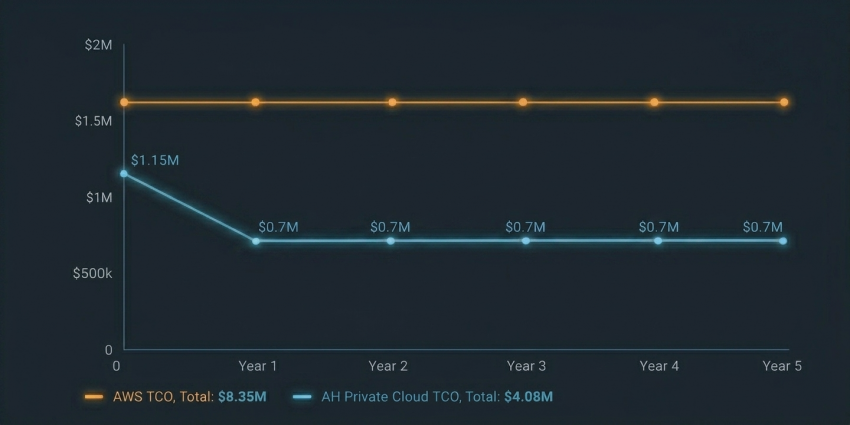
A 5-Year TCO Comparison: AWS vs. Advanced Hosting Private Cloud (taken from a client success story)
Repatriation Needs Expertise and the Right Cloud Migration Strategy
A good TCO case can justify repatriation on paper. The specifics of execution will decide whether the move works in practice.
Once a workload leaves the public cloud, new infrastructure decisions pop up. The company has to think about server configuration, storage layout, network design, redundancy, backup strategy, monitoring, access control, incident response, and capacity planning. These layers existed in the public cloud as well, but the provider abstracted much of them away.
Handling these layers requires expertise. Repatriation is a technical architecture project with serious financial consequences. The in-house or hired team carrying out that project needs to understand how the workload behaves, what performance it needs, where the risks sit, and how the new environment will be operated after cutover.
Start With Workload Assessment
The first step is a workload assessment. The company needs to map applications, databases, storage systems, APIs, queues, dependencies, backup flows, monitoring tools, and data-transfer patterns.
This mapping should include baseline utilization, peak utilization, storage growth, IOPS requirements, latency sensitivity, bandwidth patterns, RPO, RTO, compliance requirements, and current operational pain points. These details define the target infrastructure more accurately than a rough server-to-instance comparison.
A database workload may need fast NVMe storage and predictable latency. A media platform may need large storage capacity and fixed bandwidth economics. An AI inference layer may need GPU capacity, memory bandwidth, and tight control over cost per request. Each workload requires a different design.
Design the Target Environment Around the Workload
Dedicated infrastructure gives companies more control over hardware choices. That control only matters when the environment is designed around the workload.
Compute-heavy workloads need the right CPU architecture, core count, and memory configuration. Storage-heavy workloads need the right mix of NVMe, SSD, HDD, replication, and backup capacity. Bandwidth-heavy workloads need clear network commitments, predictable port speeds, and realistic traffic assumptions. Regulated workloads need access controls, audit trails, encryption, data location clarity, and documented operating procedures.
Given all of this, provider selection is crucial. A company can find hardware in one place and infrastructure expertise in another, but that is rarely the most cost-effective path. Repatriation works better when the provider can support sizing, network design, storage architecture, redundancy planning, migration, and post-cutover operations.
Advanced Hosting, for example, covers infrastructure architecture, hardware provisioning, and parts of cloud workload migration services for companies moving selected workloads out of hyperscalers.
For companies moving workloads out of hyperscalers, we help translate cloud usage into a target environment: compute profiles, storage tiers, network layout, replication strategy, failover design, and operational ownership. Having these skills and capabilities on your side can make repatriation dramatically more precise and more effective.
Browse production-ready dedicated servers for faster workload deployment
Plan Migration Before Cutover
The migration plan should be built before any production workload moves. The company needs a clear sequence: prepare the target environment, establish secure connectivity, replicate data, test performance, validate backups, run a pilot, define rollback steps, and schedule cutover.
Data migration deserves special attention. Large datasets rarely move cleanly in one pass. Object storage, file systems, and databases usually need continuous synchronization before the final switch. Tools such as database replication, snapshot-based transfer, and object synchronization can reduce downtime, but they require planning and testing.
Performance testing should also happen before production cutover. The team should validate network throughput, storage latency, database performance, application behavior, monitoring coverage, and recovery procedures. Average performance is useful, but tail latency and failure behavior matter more for production systems.
This is another place where provider expertise affects the outcome. A migration partner should know how to stage the move, keep both environments running during transition, test the target platform under realistic load, and prevent the old cloud environment from lingering after cutover.
Keep Operations Cloud-Like
Moving to dedicated infrastructure should preserve the operating discipline teams expect from the cloud. The environment still needs automation, version control, monitoring, alerting, patching routines, access management, and documented recovery procedures.
Infrastructure-as-code, configuration management, CI/CD, centralized logging, metrics, and runbooks help keep the environment controlled. The goal is to retain the operating habits that made cloud useful while gaining more predictable costs and stronger control over infrastructure.
Teams often want the discipline of cloud native infrastructure without staying locked into proprietary hyperscaler services. They still need APIs, templates, automation, and repeatable provisioning. A provider that supports this model can make repatriation less disruptive for engineering teams because the move does not force them into a purely manual hosting environment.
Choose the Right Level of Management
Some companies have the internal skills to operate private infrastructure directly. Others need a managed model where the provider handles hardware, network, low-level monitoring, replacement parts, and data center operations. Both approaches can work.
The right choice depends on the maturity of your infrastructure team. A strong internal platform team may want full control over the stack. A leaner engineering team may want dedicated bare-metal performance with managed support around the physical layer.
The company should establish clearly who owns hardware failures, network incidents, OS patching, hypervisor management, backup verification, security monitoring, and capacity expansion. Ambiguity creates operational risk after the migration is complete.
Advanced Hosting’s value in this context is the combination of infrastructure architecture, migration support, and managed operations on demand. That combination makes us a good fit for companies that want to leave parts of the public cloud without building a full infrastructure department around the move.
Treat Repatriation as a Controlled Program
A repatriation project should start with one well-understood workload. A pilot gives the team real evidence about migration effort, performance, cost, operational workload, and support needs. It also exposes hidden dependencies before larger systems move.
After the pilot, the company can build a repeatable pattern: assessment, design, replication, testing, cutover, monitoring, and decommissioning. This turns repatriation from a one-off migration into a controlled infrastructure program.
Decommissioning matters as much as migration. Savings appear when old cloud resources are shut down after the rollback period. Lingering instances, duplicate storage, old snapshots, and forgotten managed services can quietly reduce the financial benefit.
Cloud repatriation can improve cost control, performance, and data control when the workload fits the model. The quality of the outcome depends on infrastructure expertise: knowing what to move, how to design the target environment, how to migrate safely, and how to operate it after the switch.
Conclusion
Cloud repatriation is a way to put mature workloads in the right operating model, optimizing both cost and performance.
Even as it gains more attention, the public cloud will still have an important role in the foreseeable future. It works well for variable traffic, temporary environments, fast experimentation, global reach, and managed services that save more effort than they cost.
The problem companies are increasingly trying to fix is the default placement of every workload in the public cloud, long after its usage pattern has become stable and measurable.
Databases, storage-heavy systems, analytics platforms, AI inference workloads, and regulated data environments often need more predictable costs, stronger control, and infrastructure designed around their actual behavior. Repatriation gives companies a way to make that correction.
If an organization decides to proceed with repatriation, the migration should be handled carefully. The right approach starts with workload classification, then moves into TCO modeling, architecture design, migration planning, testing, and operations.
A workload that looks expensive in the cloud may need optimization first. A workload that depends heavily on proprietary services may need redesign. Repatriation should be considered only after these steps show that the workload still makes more sense outside the public cloud.
Advanced Hosting helps companies approach repatriation this way: workload assessment, infrastructure architecture, migration planning, dedicated bare-metal servers, managed infrastructure, and OpenStack-compatible public cloud for teams that want more portability without giving up cloud operating patterns.
If your cloud bill has become difficult to forecast, or if specific workloads no longer fit public cloud economics, contact us. We’ll help you assess what should move and pick the architecture that gives you the best balance of cost, performance, and control.
What is cloud repatriation?
Cloud repatriation is the process of moving applications, data, or infrastructure workloads out of a public cloud environment and into private servers, private cloud infrastructure, colocation, dedicated bare-metal servers, or another hosting environment. In most cases, it is selective. Companies move workloads that have become too expensive, predictable, data-heavy, or control-sensitive to keep in the public cloud.
Why are companies talking about cloud repatriation in 2026?
Companies are talking about cloud repatriation because cloud costs have become harder to forecast and manage. Many organizations moved workloads to hyperscalers for flexibility, but some workloads later became stable, storage-heavy, or bandwidth-heavy. Once usage is predictable, the public cloud premium may become harder to justify. Security, isolation, and sovereignty requirements also make repatriation relevant for regulated businesses.
Does cloud repatriation mean leaving the public cloud completely?
Usually, no. Most companies are not trying to move everything out of AWS, Azure, or Google Cloud. They are reviewing workloads one by one and deciding where each system should run. Public cloud often remains useful for variable traffic, temporary environments, experimentation, global reach, and selected managed services.
Which workloads are good candidates for cloud repatriation?
Good candidates usually have stable usage, high data movement, large storage needs, predictable compute demand, or strict control requirements. Common examples include primary databases, search clusters, backup storage, analytics pipelines, AI inference workloads, and regulated data processing systems. These workloads often benefit from predictable costs, direct hardware access, and clearer operational control.
Which workloads should stay in the public cloud?
Workloads with unpredictable demand often fit the public cloud well. Temporary development environments, early product experiments, traffic spikes, global distribution, and managed services that would be expensive to rebuild can still justify public cloud pricing. The point is not to remove the cloud from the architecture, but to stop using it by default for every workload.
How does TCO help decide whether repatriation makes sense?
TCO, or total cost of ownership, compares the full cost of running a workload in different environments. It includes compute, storage, data transfer, backups, monitoring, support, migration work, redundancy, licensing, and engineering time. A TCO model gives companies a more reliable decision framework than comparing a monthly cloud bill to a server invoice.
Should companies optimize cloud costs before repatriating?
Yes. Repatriation should come after optimization. Idle instances, oversized databases, excessive log retention, unused storage, orphaned snapshots, and misaligned reserved capacity can all inflate the cloud baseline. Companies should first understand what an optimized cloud workload costs, then compare that number with the cost of dedicated or private infrastructure.
How does AI affect the cloud repatriation discussion?
AI makes infrastructure cost more visible because production inference can become a recurring product cost. Every document processed, recommendation generated, support reply drafted, or fraud signal scored may consume compute. Public cloud works well for pilots and experimentation, but predictable AI workloads may need stable capacity, direct hardware access, and a clearer cost per inference.
What role does hybrid cloud infrastructure play in repatriation?
Hybrid cloud infrastructure is often the practical outcome of repatriation. Public cloud handles variable demand, temporary environments, and selected managed services. Dedicated or private infrastructure handles predictable workloads, high data movement, stricter control, and stable performance needs. This approach lets companies place workloads based on behavior rather than habit.
Why does infrastructure expertise matter in cloud repatriation?
Cloud repatriation changes how infrastructure is designed, operated, and supported. Companies need to plan server configuration, storage layout, network design, redundancy, backup, monitoring, access control, migration, and post-cutover operations. A provider with infrastructure architecture and migration experience can help reduce risk and make the move more precise.